dsh-superagent 部署指南 发出来以后,问得最多的是:能不能在 Slack 里 @ 它?能不能在 Linear 的 Issue 里 @ 它干活?
先说结论:目前官方不支持。 dsh-superagent 只自带两个 Source:GitHub 和飞书(Lark 国际版也走飞书 Source)。仓库里没有 Slack 或 Linear 的代码。想接,只能按仓库的 docs/008 Cookbook 自己写一个 Source。这篇就讲怎么写:Source 接口长什么样、Slack 和 Linear 各该用哪些官方 API、代码骨架怎么搭,以及安全上要注意什么。
说明:dsh-superagent 的 README 第一句是 “Research prototype for reference only, not an official DeepSeek product.”,也就是研究原型,不是 DeepSeek 的官方产品。下文的接口和字段来自该仓库的 docs/006、docs/008 和
src/sources/源码,Slack 和 Linear 的 API 名、scope 和参数来自 docs.slack.dev 和 linear.app/developers(2026-11-03 查阅,dsh-superagent 版本 0.1.0)。文中代码是按 Cookbook 接口写的示例骨架,没有编译和运行过,我也没有端到端跑过这两个集成。
一、先确认:官方到底支持哪些 Source
我把仓库 src/sources/ 目录和文档逐个看了一遍:
| 来源 | 官方状态 | 依据 |
|---|---|---|
| GitHub | 内置 | src/sources/github*.ts,README |
| 飞书 | 内置(可选插件 dsh-superagent-feishu) |
src/sources/feishu*.ts,docs/006 “Feishu bot (optional)” |
| Lark 国际版 | 内置,走飞书 Source,lark-cli 用 --brand lark |
docs/006 “a Feishu or Lark app”,src/deployment.ts 读取 brand |
| Slack | 没有 | src/sources/ 里没有相关文件,全仓库搜不到 slack |
| Linear | 没有 | 同上 |
有的英文转述把它写成了“集成 Slack”,但仓库里没有这部分代码。官方给的扩展方式是 docs/008:用一个虚构的消息队列 CLI hookq,示范怎么从零加一个 Source。
社区里有没有现成的?
我在 GitHub、X 和网上搜了一圈,没有找到实现成 dsh-superagent Source 的 Slack 或 Linear 集成。找到的都是 DeepSeek Harness(DSH)本身的工具插件,和 superagent 的 Source 是两回事:
- STARDUSTLC666/dsh-slack:社区 DSH 插件,MIT 协议,给 DSH 的模型提供
slack_notify、slack_inbox、slack_reply等工具,用 Socket Mode 收消息。它让你自己用的 DSH 会话能读写 Slack,但不会把 Slack 消息变成 superagent 的 Trigger,也不走 Policy 白名单。 - 也有文章示范用第三方 CLI 给 DSH 写一个能发 Slack、建 Linear Issue 的工具插件,同样是“工具”,不是“Source”。
两者的区别在于:工具是 agent 主动去调用的,Source 是外部消息进来以后先过准入规则、再决定要不要开 Ticket。 想要“团队在 Slack 里 @ 它,只有白名单里的人能派活”,只能写 Source。
二、Source 接口:Cookbook 要你实现什么
docs/008 把一个 Source 拆成四件事:翻译事件、定义接收和授权规则、提供回复和上下文、维护轮询循环。对应 SourceKind 接口(src/sources/kind.ts)里的这些部分:
| 部分 | 作用 | Slack 怎么对应 | Linear 怎么对应 |
|---|---|---|---|
kind / schema / fields |
Source 的 id、配置校验、面板表单 | slack,配置接收的频道 |
linear,配置接收的 team |
| Trigger 翻译 | 一条外部消息 → 一个 Trigger,id 必须稳定 | 一条 app_mention,id 用 频道:ts |
一条提到 agent 的评论 |
scope |
这条消息在不在接收范围 | 频道是否在列表里 | team 是否在列表里 |
channel.send |
回复,必须幂等 | chat.postMessage + thread_ts |
commentCreate + parentId |
threadContext |
给评估读上下文 | conversations.replies |
读根评论和它的回复 |
policy |
谁能派活(白名单) | Slack user ID(U…/W…) |
Linear user ID |
environment |
给 prepare 命令的变量 | DSH_SUPERAGENT_SLACK_CHANNEL |
DSH_SUPERAGENT_LINEAR_ISSUE |
| 插件入口 + 循环 | 等 setup 完成、跟随开关、处理错误和 abort | Socket Mode 长连接 | 定时轮询 |
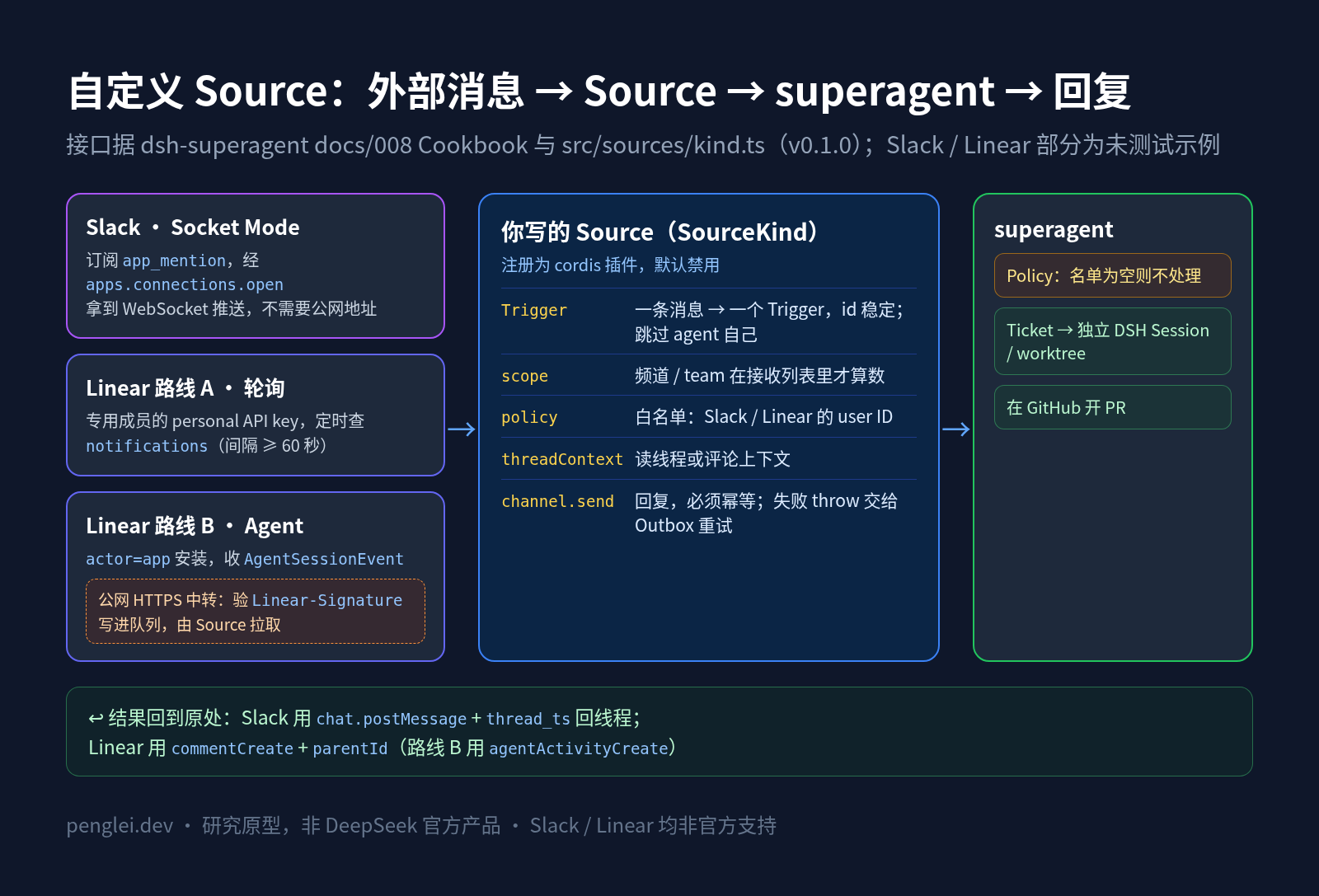
几条 Cookbook 原则,写 Slack 和 Linear 时都要守住:
- Trigger id 必须稳定。 Engine 对重复 id 返回
duplicate,所以重复读到同一条消息是安全的。 - 永远不要给 agent 自己的消息生成 Trigger。
meta和text都是不可信数据,不是授权(docs/008 原话:“Bothmetaandtextare untrusted data, not authorization.”)。send要幂等。 发送可能在对方已经收到后才失败,重试不能发两遍。只有永久发不出去时才返回gone,其他失败一律 throw,让 Outbox 重试(5 秒起,翻倍到 300 秒)。- 默认什么都不接收。 新实例按 schema 默认值创建,默认值应该是空列表。
还有两个限制要先知道:
- setup 只检查 GitHub 和飞书(docs/008:“Setup currently checks only GitHub and Feishu fields listed in
SETUP_FIELDS”)。自己加的 Source,凭据和身份要自己校验。 - 新 Source 没有内置 skill。 文档写明,新 kind 不会自动获得内置 skill、读取原始记录的资源,也不会绑定 PR。worker 只能通过
orchestrator_read trigger/<id>和thread/<key>读消息内容。干完活仍然是在 GitHub 上开 PR,再由channel.send把结果回到 Slack 或 Linear。
三、dsh-superagent Slack 接入:用 Socket Mode 收 app_mention
为什么选 Socket Mode
dsh-superagent 的面板只监听 127.0.0.1,飞书也是用长连接收消息,不需要公网地址。Slack 里对应的做法是 Socket Mode:先用 app-level token 调 apps.connections.open 拿到一个 WebSocket 地址,事件就从这个连接推过来,不需要公网 Request URL。官方文档还写了,Socket Mode 收到的事件“no need to verify or validate”,因为连接本身已经认证过。
代价有两条,都写在 Slack 文档里:Socket Mode 应用不能上架 Slack Marketplace,而且连接每隔几个小时就会刷新,要能自动重连。团队内部自用,这两条都不是问题。
1. 创建 Slack App(官方步骤)
- 在 api.slack.com/apps 创建应用,选你的工作区。
- 打开 Socket Mode,生成一个 app-level token(
xapp-开头),scope 选connections:write。 - 在 Event Subscriptions 里订阅 bot 事件
app_mention。 - 在 OAuth & Permissions 里加 bot token scopes(见下表),安装到工作区,拿到 Bot User OAuth Token(
xoxb-开头)。 - 在要用的频道里把机器人邀请进来。按 Slack 文档,app 不在频道里时,被 @ 也收不到事件。
| Scope | 类型 | 用途 | 来源 |
|---|---|---|---|
connections:write |
App-level | 调 apps.connections.open 建立 Socket Mode 连接 |
scope 文档 |
app_mentions:read |
Bot | 接收 app_mention 事件 |
app_mention 事件文档 |
chat:write |
Bot | chat.postMessage 在线程里回复 |
chat.postMessage 文档 |
channels:history |
Bot | conversations.replies 读公开频道的线程 |
conversations.replies 文档 |
groups:history |
Bot | 同上,私有频道(不用就别加) | conversations.replies 文档 |
私聊不会触发 app_mention。要收私聊,得另外订阅 message.im 并加 im:history,下面的骨架没有做。
2. 给 Source 一个只用机器人令牌的 CLI
dsh-superagent 的惯例是把凭据放在 CLI 包装脚本里,比如 gh-agent、lark-bot,而不是放进 dsh 的设置。Slack 官方 CLI 从 v4.1.0 起有 slack api <method> 命令,可以直接调任意 Web API 方法,令牌按优先级从 --token、--app、环境变量 SLACK_BOT_TOKEN 依次读取。v4.12.0 修复了 GET 请求的参数传递,所以建议装 4.12.0 以上:
mkdir -p ~/.config/slack-bot && chmod 700 ~/.config/slack-bot
# 把 xoxb- 令牌写进 ~/.config/slack-bot/bot-token,xapp- 令牌写进 ~/.config/slack-bot/app-token,两个文件都 chmod 600
cat > ~/.local/bin/slack-bot <<'EOF'
#!/bin/sh
SLACK_BOT_TOKEN="$(cat "$HOME/.config/slack-bot/bot-token")" exec slack api "$@"
EOF
chmod +x ~/.local/bin/slack-bot
slack-bot auth.test
auth.test 返回的 user_id 就是机器人自己的 ID,下面用它过滤掉 agent 自己发的消息。
注:
slack api在项目目录外只靠SLACK_BOT_TOKEN能否正常工作、输出是不是原样的 JSON 响应,是按官方命令文档推断的,没有实际跑过。
3. 代码骨架:src/sources/slack.ts(未测试)
下面按 docs/008 的接口写。导入、health、sourceContext 和插件入口都照 Cookbook 的写法;Socket Mode 部分用的是 Node 22 内置的 WebSocket(Node 22.4 起是稳定 API,dsh-superagent 要求 Node 22.19+)。
// 未经测试的示例代码:按 dsh-superagent docs/008-cookbook.md 的 Source 接口改写
import type { Context } from '@deepseek-ai/cordis'
import { readFileSync } from 'node:fs'
import { setTimeout as delay } from 'node:timers/promises'
import { z } from 'zod'
import { key, type OutboundMessage, type Trigger } from '../core/index.ts'
import { health, sourceContext, type SourceContext } from './host.ts'
import type { SourceKind } from './kind.ts'

const ConfigSchema = z.object({
  // 默认不接收任何频道(Cookbook:Make defaults receive nothing)
  channels: z.array(z.object({ id: z.string().regex(/^[CG][A-Z0-9]+$/) }).strict()).default([]),
  appTokenFile: z.string().default(''), // xapp- 令牌文件的绝对路径;文件里是令牌,配置里只放路径
}).strict()
export type SlackConfig = z.infer<typeof ConfigSchema>

class SlackError extends Error { constructor(readonly code: string) { super(`Slack API error: ${code}`) } }
/** 通过 slack-bot 包装脚本调用 Slack Web API;Slack 失败时 HTTP 也可能是 200,所以要看 ok 字段。 */
async function slackApi<T>(host: Pick<SourceContext, 'commands'>, method: string, params: Record<string, unknown>, get = false) {
  const args = get
    ? [method, '--method', 'GET', ...Object.entries(params).map(([k, v]) => `${k}=${String(v)}`)]
    : [method, '--json', JSON.stringify(params)]
  const out = JSON.parse(await host.commands.run('slack-bot', args)) as { ok: boolean; error?: string } & T
  if (!out.ok) throw new SlackError(out.error ?? 'unknown_error')
  return out
}

const MentionSchema = z.looseObject({
  type: z.literal('app_mention'), user: z.string().optional(), bot_id: z.string().optional(),
  text: z.string(), ts: z.string(), thread_ts: z.string().optional(), channel: z.string(),
})
type SlackMention = z.infer<typeof MentionSchema>

/** 一条 app_mention 对应一个 Trigger;线程 = 频道 + 根消息 ts;agent 自己的消息不生成 Trigger。 */
export function slackTrigger(e: SlackMention, me: string): Trigger | undefined {
  if (e.user === me) return undefined
  const root = e.thread_ts ?? e.ts
  const thread = `${e.channel}:${root}`
  return {
    id: key('slack', `${e.channel}:${e.ts}`),
    source: 'slack',
    threads: [{ source: 'slack', id: thread }],
    actor: { source: 'slack', id: e.user ?? '' },
    human: !e.bot_id,
    addressed: 'mention',
    at: new Date(Number(e.ts) * 1000).toISOString(),
    text: e.text,
    channel: { source: 'slack', thread: `slack:${thread}`, address: { channel: e.channel, threadTs: root } },
    meta: { channel: e.channel, ts: e.ts, root },
  }
}

/** 在原线程里回复。chat.postMessage 没有文档化的幂等参数,这里用 message metadata 标记 key,发之前先查一遍。 */
export async function sendSlack(host: Pick<SourceContext, 'commands'>, message: OutboundMessage): Promise<'sent' | 'gone'> {
  const { channel, threadTs } = message.channel.address
  if (!channel || !threadTs) throw new Error('Missing Slack reply target')
  try {
    const thread = await slackApi<{ messages: { metadata?: { event_payload?: { key?: string } } }[] }>(host,
      'conversations.replies', { channel, ts: threadTs, include_all_metadata: true, limit: 200 }, true)
    if (thread.messages.some(m => m.metadata?.event_payload?.key === message.id)) return 'sent'
    await slackApi(host, 'chat.postMessage', { channel, thread_ts: threadTs, text: message.text,
      metadata: { event_type: 'dsh_superagent_reply', event_payload: { key: message.id } } })
    return 'sent'
  } catch (error) {
    // 频道不存在或已归档:永久发不出去,返回 gone;其他错误 throw,交给 Outbox 重试
    if (error instanceof SlackError && ['channel_not_found', 'is_archived'].includes(error.code)) return 'gone'
    throw error
  }
}

export const slackKind: SourceKind<SlackConfig> = {
  kind: 'slack',
  title: { zh: 'Slack', en: 'Slack' },
  description: { zh: '接收下列频道里 @ 机器人的消息。', en: 'Receives mentions of the bot in these channels.' },
  schema: ConfigSchema,
  fields: [
    { key: 'channels', type: 'rows', label: { zh: '接收的频道', en: 'Channels' }, columns: [
      { key: 'id', type: 'text', label: { zh: '频道 ID', en: 'Channel ID' }, pattern: '[CG][A-Z0-9]+' }] },
    { key: 'appTokenFile', type: 'text', advanced: true, label: { zh: 'App-level token 文件', en: 'App-level token file' } },
  ],
  health: ['slack'],
  scope({ meta }, config) {
    const listed = config.channels.some(c => c.id === meta.channel)
    return listed ? { listened: true, observed: false, row: String(meta.channel) } : { listened: false, reason: 'channel_not_listed' }
  },
  channel: {
    allowed: (address, config) => config.channels.some(c => c.id === address.channel),
    send: sendSlack,
    link: address => ({ url: '', label: { zh: `Slack 频道 ${address.channel}`, en: `Slack channel ${address.channel}` } }),
  },
  threadContext: {
    messageId: trigger => String(trigger.meta.ts ?? ''),
    read: async (commands, trigger, _part, cursor) => {
      const page = await slackApi<{ messages: { ts: string; user?: string; bot_id?: string; text: string }[];
        response_metadata?: { next_cursor?: string } }>({ commands }, 'conversations.replies',
        { channel: String(trigger.meta.channel), ts: String(trigger.meta.root), limit: 50, ...(cursor ? { cursor } : {}) }, true)
      const messages = page.messages.map(m => ({ id: m.ts, from: m.user ?? m.bot_id ?? '', at: new Date(Number(m.ts) * 1000).toISOString(),
        text: m.text, ...(m.bot_id ? { bot: true as const } : {}) }))
      const next = page.response_metadata?.next_cursor
      return { messages, ...(next ? { next } : {}), body: { messages } }
    },
  },
  policy: {
    schema: z.object({ allowed: z.array(z.object({ id: z.string().regex(/^[UW][A-Z0-9]+$/),
      name: z.string().trim().max(100).optional() }).strict()).default([]) }).strict(),
    fields: [{ key: 'allowed', type: 'rows', label: { zh: '能发起工作的 Slack 用户', en: 'Slack users who may originate work' }, columns: [
      { key: 'id', type: 'text', label: { zh: 'Slack 用户 ID', en: 'Slack user ID' } },
      { key: 'name', type: 'text', label: { zh: '名字', en: 'Name' }, optional: true }] }],
    explicit: { zh: '名单里的人在频道里 @ 机器人。', en: 'Someone on the list mentions the bot in a channel.' },
    // 只订阅了 app_mention,收不到未 @ 的消息,所以“未 @”的格子都不可用
    rows: stored => ConfigSchema.parse(stored).channels.map(c => ({ id: c.id, label: c.id, note: { zh: '仅 @', en: '@ only' },
      cells: { listedUnaddressed: false, unlistedAddressed: true, unlistedUnaddressed: false } })),
  },
  environment: {
    variables: [{ key: 'DSH_SUPERAGENT_SLACK_CHANNEL', description: {
      zh: '接下工单的 Slack 频道;工单不是从 Slack 来的时为空', en: 'The Slack channel that started the ticket; empty otherwise' } }],
    values: ({ trigger }) => ({ DSH_SUPERAGENT_SLACK_CHANNEL: trigger?.source === 'slack' ? String(trigger.meta.channel ?? '') : '' }),
  },
}

/** 一次 Socket Mode 连接:apps.connections.open 拿 wss 地址,收 events_api,先存 Trigger 再用 envelope_id 确认。 */
async function connectOnce(ctx: SourceContext, config: SlackConfig, me: string, signal: AbortSignal): Promise<void> {
  const appToken = readFileSync(config.appTokenFile, 'utf8').trim()
  const res = await fetch('https://slack.com/api/apps.connections.open', { method: 'POST', signal,
    headers: { authorization: `Bearer ${appToken}`, 'content-type': 'application/x-www-form-urlencoded' } })
  const open = await res.json() as { ok: boolean; url?: string; error?: string }
  if (!open.ok || !open.url) throw new SlackError(open.error ?? 'no_url')
  const ws = new WebSocket(open.url)
  await new Promise<void>((resolve, reject) => {
    const stop = () => ws.close()
    signal.addEventListener('abort', stop, { once: true })
    ws.onclose = () => { signal.removeEventListener('abort', stop); resolve() } // Slack 定期刷新连接,外层循环会重连
    ws.onerror = () => reject(new Error('Slack Socket Mode connection failed'))
    let chain = Promise.resolve()
    ws.onmessage = ({ data }) => {
      chain = chain.then(async () => {
        const frame = JSON.parse(String(data)) as { type: string; envelope_id?: string; payload?: { event?: unknown } }
        if (frame.type === 'hello') ctx.report('slack', { state: 'ready', detail: 'Socket Mode connected', at: new Date().toISOString() })
        if (frame.type === 'disconnect') { ws.close(); return }
        if (frame.type !== 'events_api' || !frame.envelope_id) return
        const event = MentionSchema.safeParse(frame.payload?.event)
        // 已关掉的 Source 不再收新消息
        if (event.success && ctx.config<SlackConfig>('slack')) {
          const trigger = slackTrigger(event.data, me)
          if (trigger) await ctx.receive(trigger)
        }
        ws.send(JSON.stringify({ envelope_id: frame.envelope_id }))
      }).catch((error: unknown) => { ctx.report('slack', { state: 'error', detail: String(error) }) })
    }
  })
}

async function watch(ctx: SourceContext, signal: AbortSignal): Promise<void> {
  await ctx.ready
  if (!ctx.configured()) { ctx.report('slack', health('paused', 'setupPending')); return }
  let failures = 0
  while (!signal.aborted) {
    const config = ctx.config<SlackConfig>('slack')
    if (!config) { ctx.report('slack', health('paused', 'sourceOff')); await delay(5000, undefined, { signal }).catch(() => {}); continue }
    try {
      const me = (await slackApi<{ user_id: string }>(ctx, 'auth.test', {})).user_id // 自检:令牌有效,并拿到机器人自己的 ID
      await connectOnce(ctx, config, me, signal)
      failures = 0
    } catch (error) {
      failures += 1
      if (!signal.aborted && failures >= 3) {
        ctx.report('slack', health('error', 'pollFailures', { count: String(failures), error: String(error) }))
      }
      await delay(Math.min(60_000, 1000 * 2 ** failures), undefined, { signal }).catch(() => {})
    }
  }
}

export const name = 'dsh-superagent-slack'
export const inject = ['orchestrator']
export function apply(ctx: Context): void {
  ctx.effect(() => ctx.orchestrator.sources.register(slackKind), 'slack: source kind')
  ctx.effect(() => {
    const source = sourceContext(ctx.orchestrator, slackKind)
    const controller = new AbortController()
    const running = watch(source, controller.signal)
      .catch((error: unknown) => { source.report('slack', { state: 'error', detail: String(error) }) })
    return async () => { controller.abort(); await running }
  })
}
几处设计说明:
- 先存再确认。 Slack 文档要求每个事件都用
envelope_id确认,好让 Slack 知道要不要重发。这里先ctx.receive再确认,相当于 Cookbook 里“先存 Trigger 再移动游标”。重发的事件 id 一样,Engine 会判成duplicate。 - 幂等发送。
chat.postMessage没有文档化的幂等参数,所以借用 message metadata 存message.id,发之前用conversations.replies(include_all_metadata)查一遍。注意 Slack 文档的提醒:metadata 对工作区里所有成员和应用可见,不要往里放敏感信息。 - 断线期间的消息。 Socket Mode 断开期间发生的 @ 会不会全部补发,我没在文档里找到明确说法。要更稳,可以像飞书 Source 那样,再加一个用
conversations.history补收的循环(骨架里没做)。按 Slack 2025 年的变更,未上架 Marketplace 的商业分发应用调用conversations.history会被限到每分钟 1 次;内部自建应用不受影响,仍是 Tier 3。
4. 注册插件
按 docs/008 第 10 步:
- 在
tsdown.config.ts的 entry 里加'slack-watch': 'src/sources/slack.ts'; package.json的exports加"./slack-watch": "./lib/slack-watch.js";- bundle 的
cordis.patch.yml的insert列表里加一项,默认禁用:
    - id: dsh-superagent-slack
      name: dsh-superagent/slack-watch
disabled: true- 在 profile 的
cordis.patch.yml里写上id: dsh-superagent-slack和disabled: false,然后 build 并重启。新 Source 会出现在 Sources 设置和 Eval → On each Source 里。 - 把模块和测试加进 docs/007 的表格,
tests/docs.spec.ts会检查索引是否完整。测试按tests/sources.spec.ts的写法 mockCommands.run。
四、dsh-superagent Linear 接入:两条路线
Linear 比 Slack 麻烦:它没有 Socket Mode 这样的长连接,官方推荐的推送方式是 Webhook,而 Webhook 要求“publicly accessible HTTPS, non-localhost URL”,也就是公网可访问的 HTTPS 地址。dsh-superagent 的面板只听 127.0.0.1,不要为了接 Linear 把面板暴露到公网。所以有两条路:
| 路线 | 怎么做 | 优点 | 代价 |
|---|---|---|---|
| A:专用成员 + 轮询 | 建一个 Linear 成员给 agent,用它的 personal API key 定时查 notifications |
和 GitHub Source 思路一致(GitHub 也是轮询 agent 账号的 notifications),不需要公网 | Linear 文档明确“discourage”轮询;普通成员占一个席位 |
| B:Linear Agent + Webhook 中转 | OAuth 应用用 actor=app 安装,申请 app:mentionable / app:assignable,收 AgentSessionEvent |
Linear 原生的 agent 体验,官方说 agent “do not count as billable users” | 需要一个公网 HTTPS 中转服务;created 事件后 10 秒内要回一个 activity |
小团队先试,路线 A 更简单;准备长期用,再考虑路线 B。下面的骨架用路线 A,路线 B 给出 Webhook 校验的关键代码。
路线 A:专用成员 + GraphQL 轮询
1. 准备身份和 CLI。 给 agent 建一个 Linear 成员,在它的 Security & access 设置里创建 personal API key。Linear 的认证方式是请求头 Authorization: <API_KEY>(personal key 不带 Bearer)。照 gh-agent 的思路包一个 CLI,把 key 放在文件里,让 curl 用 -H @文件 读请求头,key 就不会出现在进程参数里:
mkdir -p ~/.config/linear-agent && chmod 700 ~/.config/linear-agent
# ~/.config/linear-agent/auth-header 里只有一行:authorization: <API_KEY>,chmod 600
cat > ~/.local/bin/linear-agent <<'EOF'
#!/bin/sh
# 用法:linear-agent '{"query": "...", "variables": {...}}'
exec curl -sS --fail-with-body https://api.linear.app/graphql \
  -H "content-type: application/json" -H @"$HOME/.config/linear-agent/auth-header" --data "$1"
EOF
chmod +x ~/.local/bin/linear-agent
linear-agent '{"query": "query Me { viewer { id name } }"}'
viewer.id 就是 agent 自己的 Linear user ID,用来过滤它自己的评论。
2. 限流。 Linear 对 API key 的限制是每个用户每小时 2,500 次请求,复杂度上限每小时 300 万点,单个查询最多 1 万点。每 60 秒轮询一次,一小时也就 60 次,余量很大。但 Linear 文档的原话是 “One thing that we especially discourage is polling”,所以间隔别设太短。
3. 骨架(未测试,只列和 Slack 不同的部分):
// 未经测试的示例代码:Linear Source 的关键部分,其余结构同上面的 Slack 骨架
import { createHash } from 'node:crypto'
import { cursorAt } from './poll.ts'
import { KV } from '../kv.ts' // 需在 KV 里登记:linear: { cursor: record<string>('linear-cursor') }

const ConfigSchema = z.object({
  teams: z.array(z.object({ key: z.string().min(1) }).strict()).default([]),   // 接收的 team key,如 ENG
  // 哪些通知类型算“@ 了 agent”。先手动 @ 一次 agent 账号,再用 notifications 查询看实际的 type 值填进来
  mentionTypes: z.array(z.string()).default([]),
  pollSeconds: z.number().int().min(60).max(3600).default(60),
}).strict()
type LinearConfig = z.infer<typeof ConfigSchema>
type LinearNotification = { id: string; type: string; createdAt: string
  comment?: { id: string; body: string; url: string; createdAt: string; user?: { id: string } | null; parent?: { id: string } | null } | null
  issue?: { id: string; identifier: string; url: string; team: { key: string } } }

async function linear<T>(host: Pick<SourceContext, 'commands'>, query: string, variables: Record<string, unknown> = {}): Promise<T> {
  const out = JSON.parse(await host.commands.run('linear-agent', [JSON.stringify({ query, variables })])) as
    { data?: T; errors?: { message: string }[] }
  // GraphQL 可能部分成功但带 errors,按官方建议先检查 errors
  if (out.errors?.length || !out.data) throw new Error(`Linear: ${out.errors?.map(e => e.message).join('; ') ?? 'no data'}`)
  return out.data
}

const NOTIFICATIONS = `query($after: DateTimeOrDuration!) {
  notifications(filter: { createdAt: { gt: $after } }, orderBy: createdAt, first: 50) {
    nodes { id type createdAt
      ... on IssueNotification {
        comment { id body url createdAt user { id } parent { id } }
        issue { id identifier url team { key } } } } } }`

/** 轮询一轮:读游标之后的通知,逐条 receive,全部存完再移动游标(Cookbook 第 9 步)。 */
async function pollLinear(ctx: SourceContext, config: LinearConfig, me: string, signal: AbortSignal) {
  const after = ctx.state.get(KV.linear.cursor) ?? new Date(Date.now() - 60_000).toISOString() // KV.linear 需在 src/kv.ts 里登记
  const started = new Date().toISOString()
  const data = await linear<{ notifications: { nodes: LinearNotification[] } }>({ commands: ctx.commands.withSignal(signal) }, NOTIFICATIONS, { after })
  for (const n of data.notifications.nodes) {
    if (signal.aborted) throw new Error('The Linear Source stopped during the read')
    const c = n.comment
    if (!c || !n.issue || c.user?.id === me) continue                         // 只处理评论;跳过 agent 自己
    const root = c.parent?.id ?? c.id
    await ctx.receive({
      id: key('linear', c.id),
      source: 'linear',
      threads: [{ source: 'linear', id: `${n.issue.id}:${root}` }],
      actor: { source: 'linear', id: c.user?.id ?? '' },
      human: Boolean(c.user),                                                   // 没有 user 的评论(如集成写入)不算人
      ...(config.mentionTypes.includes(n.type) ? { addressed: 'mention' as const } : {}),
      at: c.createdAt, text: c.body, url: c.url,
      channel: { source: 'linear', thread: `linear:${n.issue.id}:${root}`, address: { issueId: n.issue.id, parentId: root, url: c.url } },
      meta: { issueId: n.issue.id, identifier: n.issue.identifier, team: n.issue.team.key, root, commentId: c.id },
    })
  }
  ctx.state.set(KV.linear.cursor, cursorAt(started))                           // src/sources/poll.ts:往前留 5 秒余量
}

/** 由 message.id 推出一个固定的 UUID v4 格式 id;commentCreate 接受客户端指定 id,用它做幂等。 */
const uuidFor = (s: string): string => {
  const h = createHash('sha256').update(s).digest('hex')
  return `${h.slice(0, 8)}-${h.slice(8, 12)}-4${h.slice(13, 16)}-${(8 + (parseInt(h[16]!, 16) & 3)).toString(16)}${h.slice(17, 20)}-${h.slice(20, 32)}`
}

export async function sendLinear(host: Pick<SourceContext, 'commands'>, message: OutboundMessage): Promise<'sent' | 'gone'> {
  const { issueId, parentId } = message.channel.address
  if (!issueId) throw new Error('Missing Linear reply target')
  const id = uuidFor(message.id)
  // 先查这条评论是否已经发过(上次可能在对方收到后才失败)
  const seen = await linear<{ comment: { id: string } | null }>(host, 'query($id: String!) { comment(id: $id) { id } }', { id })
    .catch(() => ({ comment: null }))
  if (seen.comment) return 'sent'
  await linear(host, `mutation($input: CommentCreateInput!) { commentCreate(input: $input) { success } }`,
    { input: { id, issueId, ...(parentId ? { parentId } : {}), body: message.text } })
  return 'sent'
  // 未处理:Issue 被删除时应返回 'gone',需要先确认 Linear 对应的错误形态
}
scope 按 meta.team 是否在 teams 里判断;threadContext 可以用 comment(id: root) { body user { id } createdAt children(first: 50, after: $cursor) { nodes { ... } pageInfo { hasNextPage endCursor } } } 读根评论和回复;policy.allowed 填 Linear user ID(可以用 users 查询,或在 Linear 里 Cmd/Ctrl+K → “Copy model UUID”)。这些写法和 Slack 骨架一样,就不重复了。
注:
notifications的type是字符串,schema 里没有枚举,官方文档也没有列出取值,所以骨架里把它做成了配置项mentionTypes,由使用者自己查。commentCreate的id参数在 schema 里写的是 “The identifier in UUID v4 format. If none is provided, the backend will generate one.”,用它做幂等是我的设计,没有验证过重复 id 时的报错。
路线 B:Linear Agent + Webhook 中转(要点)
Linear 官方给 agent 的接入方式(Linear Developers → Agents):
- 创建一个 OAuth Application,打开 webhooks,勾选 Agent session events。
- 安装时在 OAuth 授权地址里加
actor=app,scope 加app:mentionable(可以被 @)、app:assignable(可以被委派 Issue)。用actor=app安装需要工作区管理员完成。 - 有人 @ 它或把 Issue 委派给它时,Linear 发
AgentSessionEvent的created事件,里面有agentSession、promptContext等字段;用户追加消息时发prompted。 - 回复用
agentActivityCreate,content.type用thought、response、error等。
和 dsh-superagent 的结合方式,可以照 Cookbook 的 hookq 例子:一个公网 HTTPS 中转服务负责验签,把事件写进队列;dsh-superagent 的 Source 从队列里拉。 中转服务有两个硬要求:
- 5 秒内返回 200,否则 Linear 会重试(1 分钟、1 小时、6 小时后各一次),持续失败可能被禁用。
- 收到
created后 10 秒内要发一个 activity(或设置 external URL),否则会话会被标成 unresponsive。dsh-superagent 从评估到接单可能远不止 10 秒,所以这个“已收到”的thought最好由中转服务直接发。这意味着中转服务也要持有 OAuth token。
Webhook 验签按 Linear 官方示例:对原始请求体做 HMAC-SHA256(密钥是 webhook 的 signing secret),和 Linear-Signature 头比对,再检查 webhookTimestamp 在 60 秒以内:
// 摘自 Linear 官方 Webhooks 文档的校验逻辑(略作精简)
import crypto from 'node:crypto'
function verifyLinear(rawBody: Buffer, headerSignature: string | undefined, secret: string): boolean {
  if (typeof headerSignature !== 'string') return false
  const expected = crypto.createHmac('sha256', secret).update(rawBody).digest()
  const given = Buffer.from(headerSignature, 'hex')
  return given.length === expected.length && crypto.timingSafeEqual(expected, given)
}
// 验签通过后:if (Math.abs(Date.now() - body.webhookTimestamp) > 60_000) 拒绝,防重放
Linear 文档还建议校验来源 IP(官方 Security 页面列了出站地址)。Slack 这边如果你不用 Socket Mode、改用 HTTP Events API,也要做同样的事:Slack 用 signing secret 对 v0:<X-Slack-Request-Timestamp>:<原始请求体> 做 HMAC-SHA256,和 X-Slack-Signature 比对,时间戳超过 5 分钟的请求直接丢弃。
五、安全:白名单、签名和提示词注入
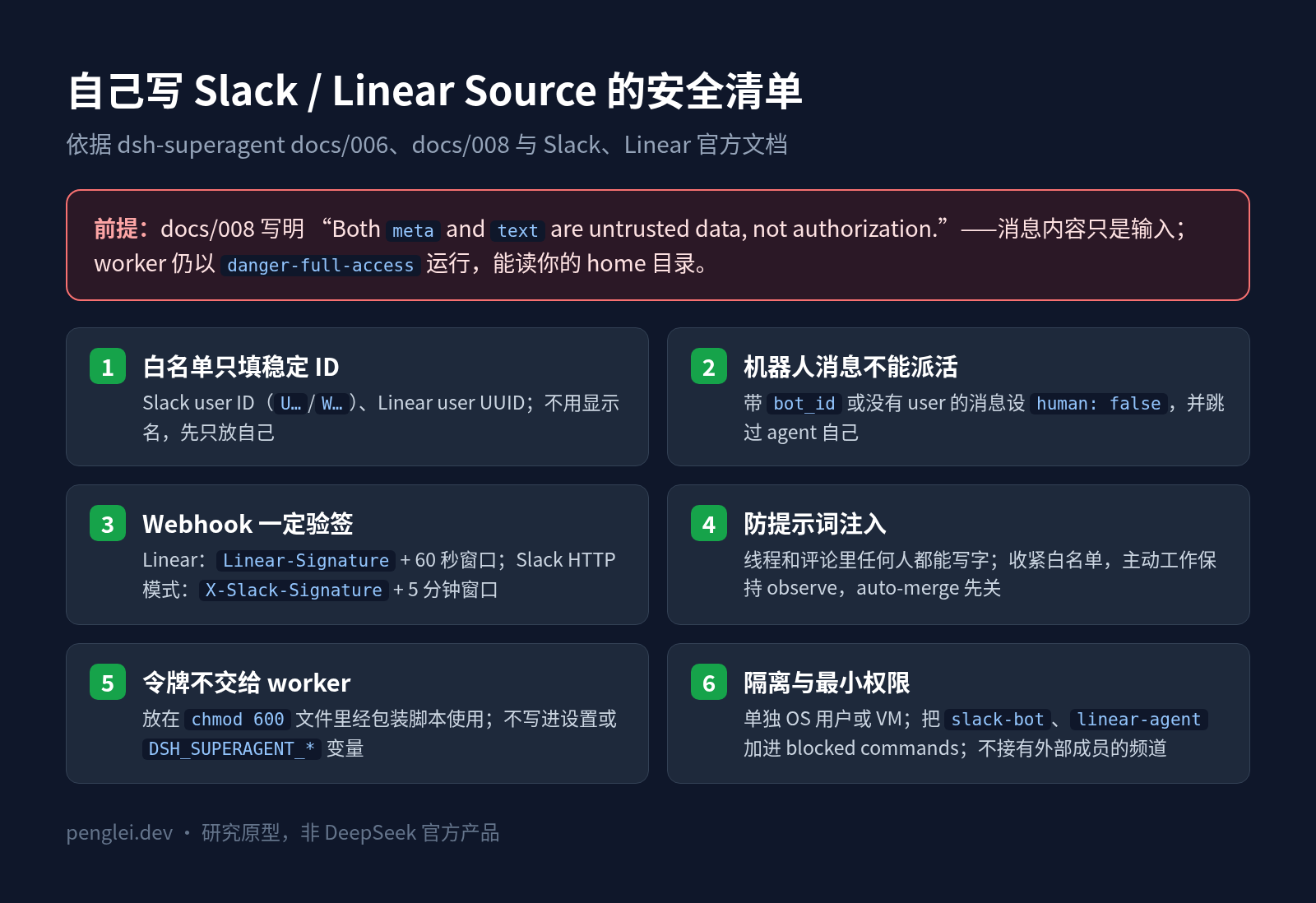
- 白名单用平台的稳定 ID,不用名字。 Slack 填 user ID(
U…/W…),Linear 填 user UUID。显示名可以改,ID 不会变。白名单为空时任何请求都不会变成 Ticket,这是 dsh-superagent 的默认行为,先只放你自己。 - 机器人发的消息不能派活。 Slack 消息带
bot_id时设human: false;Linear 评论没有user时同样处理。docs/008 写明,被列出的机器人最多成为“推断候选”,不能发起明确请求。 - 消息内容只是输入。 docs/008:“Both
metaandtextare untrusted data, not authorization.” Slack 线程和 Linear 评论里任何人都能写字,worker 读上下文时都可能读到“忽略之前的指令”之类的话。这和 AGENTS.md 投毒 是同一类风险。收紧白名单,保持主动工作的默认observe,auto-merge 先关。 - Webhook 一定要验签。 Linear 用
Linear-Signature加 60 秒时间窗,Slack HTTP 模式用X-Slack-Signature加 5 分钟时间窗,都要用原始请求体计算,比较用常量时间。Socket Mode 不需要验签。 - 凭据别给 worker。 令牌放在
chmod 600的文件里,通过包装脚本使用,不要写进 dsh 的设置或DSH_SUPERAGENT_*变量(docs/008:“never include credentials”)。setup 会去掉名字里带 KEY、PASSWORD、SECRET、TOKEN 的环境变量,但 docs/006 也提醒了:worker 以danger-full-access运行,能读你的 home 目录。真正的隔离靠单独的 OS 用户或 VM。另外,把slack-bot、slack、linear-agent加进 Execution 的 blocked commands,免得 worker 自己去发消息。 - 权限最小化。 Slack 不用私有频道就别加
groups:history,不需要往没加入的频道发消息就别加chat:write.public;Linear 路线 B 不要申请admin(actor=app本来也不允许)。Slack Connect 这类有外部成员的频道,不要加进接收列表。
六、怎么选
| 情况 | 建议 |
|---|---|
| 团队主要在 GitHub 协作 | 只用内置 GitHub Source,不用写代码 |
| 团队用飞书或 Lark | 用内置飞书 Source(Lark 加 --brand lark) |
| 团队在 Slack,想让大家 @ 它派活 | 按本文写 Slack Source,用 Socket Mode,不需要公网 |
| 只想让自己的 DSH 会话能发 Slack | 用社区 DSH 工具插件就够了,不需要 superagent |
| 团队用 Linear,先小范围试 | 路线 A:专用成员 + 60 秒以上轮询 |
| 团队用 Linear,准备长期用 | 路线 B:Linear Agent + 公网中转 + 验签 |
| 没有 TypeScript 维护能力 | 先别接,它是研究原型,接口还会变 |
最后
Slack 和 Linear 都不是 dsh-superagent 官方支持的 Source。好在 docs/008 把扩展接口写得很完整,Slack 有 Socket Mode,接起来和飞书差不多;Linear 没有长连接,要么接受轮询,要么搭一个公网中转。不管走哪条路,Cookbook 里几条规矩都要守住:id 要稳定、发送要幂等、默认什么都不接收、消息内容不算授权。
一句话:dsh-superagent 官方没有 Slack 和 Linear Source,要按 docs/008 自己写。Slack 用 Socket Mode 加 app_mention,Linear 用专用成员轮询或 Agent 加 Webhook 中转;白名单只填稳定 ID,Webhook 必须验签,令牌放在包装脚本里,不交给 worker。
还没部署 dsh-superagent 的话,先看 GitHub 部署指南;团队用 Lark,可以看 Lark 接入教程;用飞书的话,看 飞书接入教程(官方步骤在 docs/006 的 Feishu bot 一节),Lark 教程里也列了两者的差异。DSH 配 DeepSeek 模型的实际体验,见 DeepSeek V4.1 Flash 接进 OMP 和 DSH;模型账单相关,见 DeepSeek V4.1 Flash 1017 接入 Claude Code:配置与价格。
参考来源
- dsh-superagent-prototype 仓库与 README:https://github.com/deepseek-ai/dsh-superagent-prototype
- docs/008-cookbook.md(Add a Source):https://github.com/deepseek-ai/dsh-superagent-prototype/blob/main/docs/008-cookbook.md
- docs/006-deployment.md(权限与隔离、setup checks):https://github.com/deepseek-ai/dsh-superagent-prototype/blob/main/docs/006-deployment.md
- Source 接口 src/sources/kind.ts 与 host.ts:https://github.com/deepseek-ai/dsh-superagent-prototype/tree/main/src/sources
- Slack · Using Socket Mode:https://docs.slack.dev/apis/events-api/using-socket-mode
- Slack · apps.connections.open:https://docs.slack.dev/reference/methods/apps.connections.open
- Slack · connections:write scope:https://docs.slack.dev/reference/scopes/connections.write
- Slack · app_mention 事件:https://docs.slack.dev/reference/events/app_mention
- Slack · chat.postMessage:https://docs.slack.dev/reference/methods/chat.postMessage
- Slack · conversations.replies:https://docs.slack.dev/reference/methods/conversations.replies
- Slack · auth.test:https://docs.slack.dev/reference/methods/auth.test
- Slack CLI · slack api 命令:https://docs.slack.dev/tools/slack-cli/reference/commands/slack_api
- Slack CLI 发布记录(v4.1.0 新增
slack api,v4.12.0 修复 GET 参数):https://github.com/slackapi/slack-cli/releases - Slack · Verifying requests from Slack:https://docs.slack.dev/authentication/verifying-requests-from-slack
- Slack · 非 Marketplace 应用限流变更(2025-05-29)与澄清(2025-06-03):https://docs.slack.dev/changelog/2025/05/29/rate-limit-changes-for-non-marketplace-apps 、https://docs.slack.dev/changelog/2025/06/03/rate-limits-clarity
- Linear · GraphQL API 入门(认证方式):https://linear.app/developers/graphql
- Linear · Rate limiting:https://linear.app/developers/rate-limiting
- Linear · Webhooks(签名校验):https://linear.app/developers/webhooks
- Linear · Agents(actor=app、app:mentionable、app:assignable):https://linear.app/developers/agents
- Linear · Agent interaction(AgentSessionEvent、agentActivityCreate):https://linear.app/developers/agent-interaction
- Linear GraphQL schema(CommentCreateInput、notifications):https://raw.githubusercontent.com/linear/linear/refs/heads/master/packages/sdk/src/schema.graphql
- Node.js 22 全局 WebSocket:https://nodejs.org/docs/latest-v22.x/api/globals.html
- 社区 DSH 插件 dsh-slack(工具插件,非 superagent Source):https://github.com/STARDUSTLC666/dsh-slack
相关阅读:
- DeepSeek dsh-superagent 部署指南:在 GitHub 仓库里跑一个“@ 它就干活”的 coding agent
- dsh-superagent 接入飞书机器人教程:自建应用、权限、lark-cli 机器人身份配置,群里 @ 它开工单
- dsh-superagent 接入 Lark(飞书国际版)教程
- DeepSeek V4.1 Flash 接进 OMP 和 DSH 后:慢了,但做需求更周到了
- DeepSeek V4.1 Flash 1017 接入 Claude Code:配置、价格与 4 个省钱设置
- AGENTS.md 投毒自查:别在 Downloads 里开 Claude Code / Codex
Comments