Previous article:Context Explorer: Debug AI Agent Prompts and Token Usage
Next article:Patch Editing for AI Coding Agents: Apply Unified Diff Safely
中文版:Git 与 Diff Tools:状态、补丁解析与变更摘要
Introduction
Day 10: give an agent safe, read-only visibility into repository status and parsed diffs. This chapter keeps the implementation deliberately small: the point is to make one boundary explicit, testable, and easy to inspect before adding more autonomy.
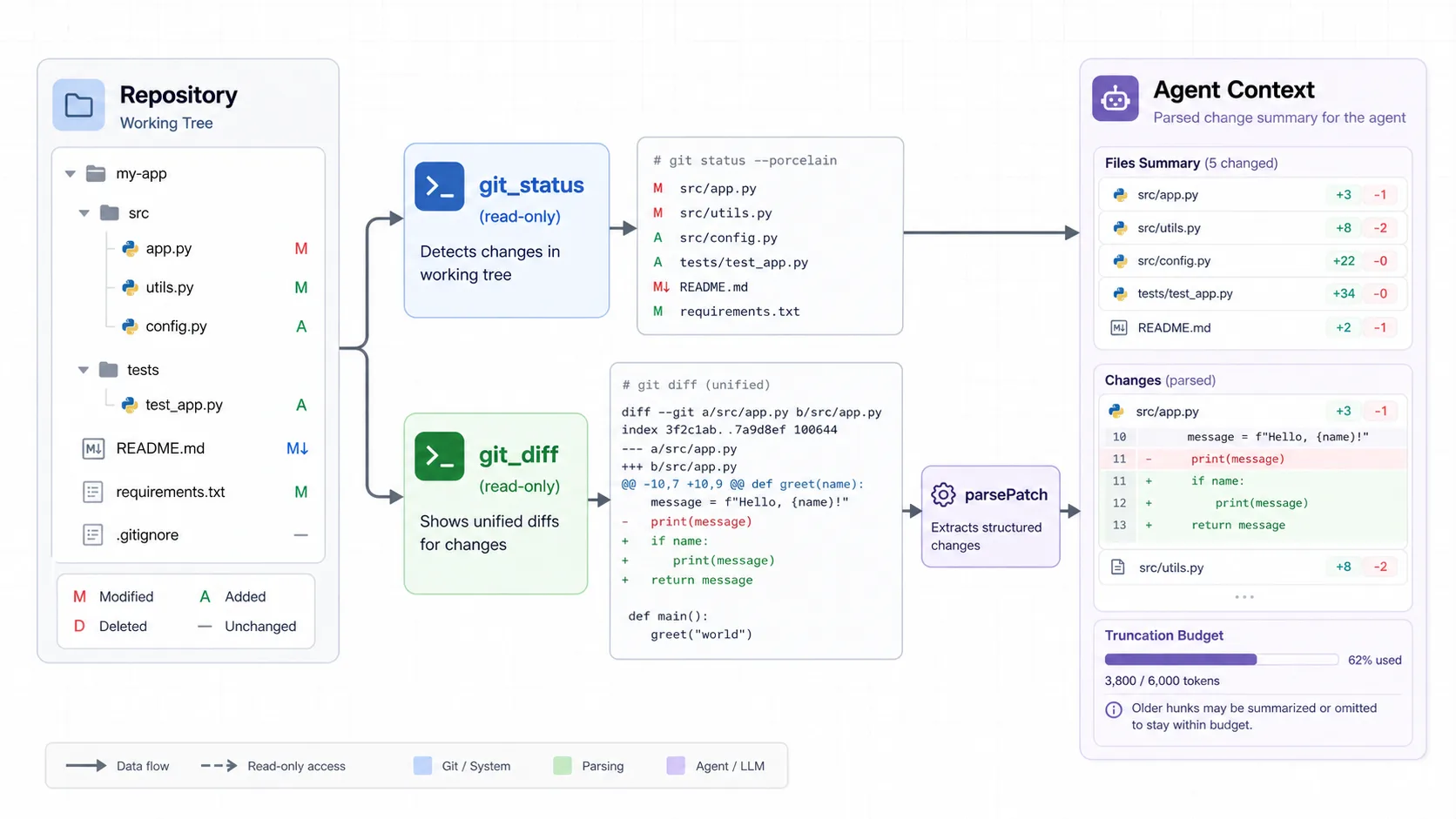
Git state is safety context
A coding agent is more than a model response. It needs a runtime that can turn a request into controlled work, preserve the intermediate state, and explain what happened afterwards. Day 10 focuses on that runtime boundary instead of hiding it behind a single prompt.
workspace → git_status / git_diff → parsed summary → agent contextTwo read-only tools
The implementation uses explicit data structures and narrow interfaces. The model proposes the next step; the harness owns validation, execution, limits, and structured results. That separation lets the same capability work in a CLI today and in a richer product surface later.
- Inspect branch and worktree state before proposing a change.
- Parse file and hunk statistics instead of giving the model raw diff only.
- Keep these tools read-only until a later approval boundary is present.
Parsing diffs into useful facts
Reliability comes from treating failure paths as normal paths. Inputs are bounded, unsafe or malformed requests produce recoverable errors, and the run records enough evidence to let a developer understand the decision. This is especially important when later steps can touch a real workspace.
npm run dev -- "check git status and summarize current diff"npm run dev -- --tool git_status --tool-input '{}'
npm run dev -- --tool git_diff --tool-input '{"maxBytes":4000}'What files are already changed?
Are there untracked files?
What exactly is in the current diff?
Is this diff small enough to send to the model?
Did the user already modify a file I am about to edit?What must wait for an approval gate
With this layer in place, later chapters can add capability without weakening the boundary: tools can be registered and observed, context can be measured, writes can require approval, and every run can be replayed. The result is not a general autonomous system; it is a compact harness whose behavior remains understandable.
Key takeaways
- Build the execution boundary before adding more tools or model freedom.
- Keep model intent separate from runtime authority.
- Make limits, validation, and failure results visible.
- Use structured observations to support debugging and future extensions.
Demo
The accompanying implementation and runnable examples are available in the cli-harness repository.
Comments