上一篇:Day 05 - Local File Tools
下一篇:Transcript Logging:Agent 执行日志与可观测性
English version: Agent Loop: Observe, Decide, Act in a Coding Agent
文章介绍
Day 05 我们给 mini harness 加了三个只读本地工具:list_files、read_file、search_text。
但它们还只是“手动工具”。用户必须显式写:
npm run dev -- --tool list_files --tool-input '{"path":".","maxDepth":1}'这还不是 agent。真正的 coding agent 不只是回答一次,也不只是执行一次工具。它需要反复做这件事:
observe -> decide -> act -> observe -> final今天实现 Day 06:一个有边界的 agent 执行循环。
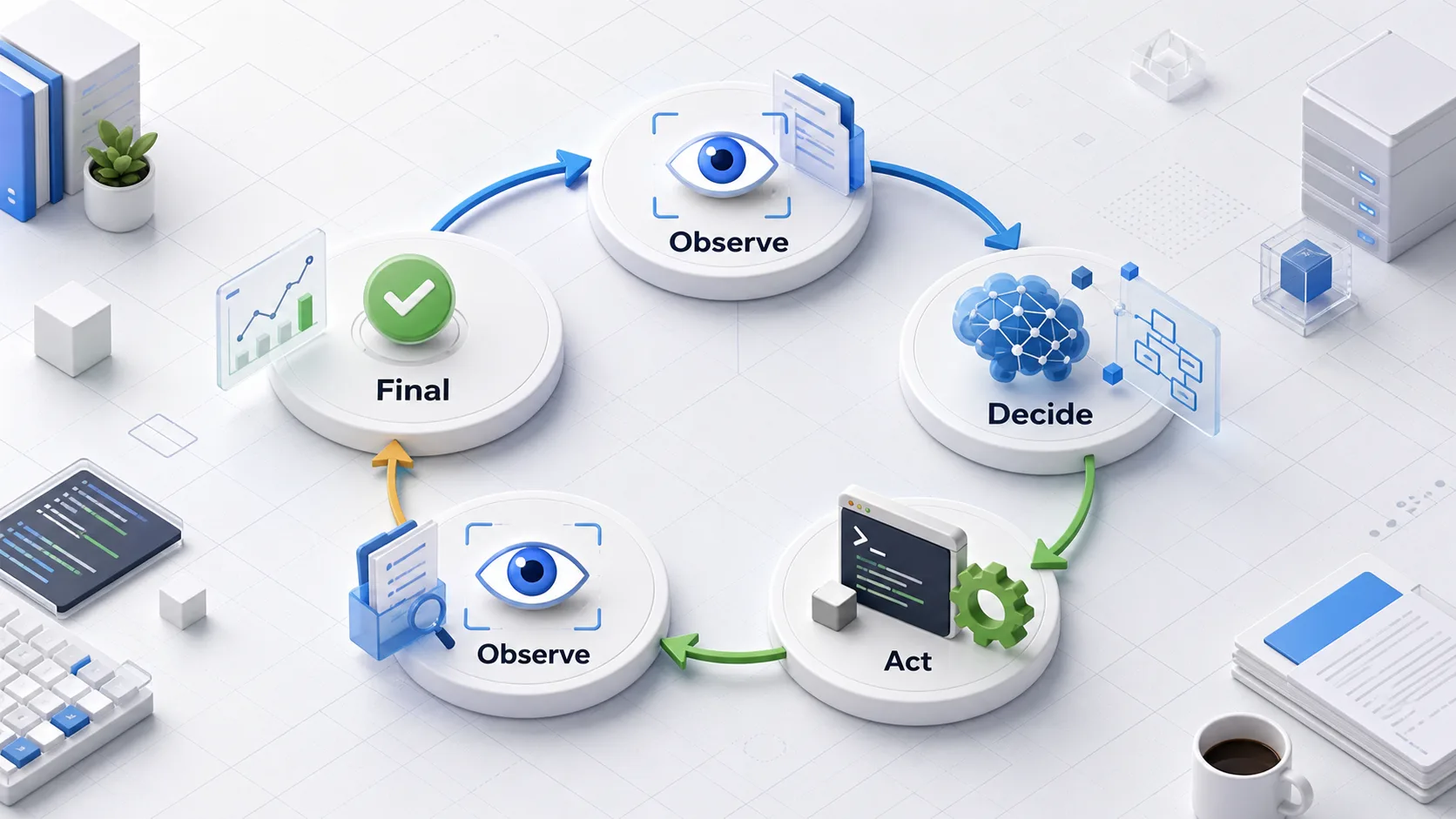
今天要解决什么
今天要完成四个交付:
- 让模型可以通过文本协议请求工具调用。
- 让 harness 解析工具调用并分发到
ToolRegistry。 - 将工具结果回写进 messages,作为下一轮观察。
- 增加
maxSteps、工具 timeout 和工具错误回灌,避免无限循环。
Demo 命令:
npm run dev -- "inspect the repo and summarize the structure"预期不再是单轮回答,而是多步执行:
Step 1 [model]: Model requested tool: list_files
Step 1 [tool]: Tool completed: list_files
Step 2 [model]: Model requested tool: read_file
Step 2 [tool]: Tool completed: read_file
Step 3 [final]: Model returned a final answer.
它在 Cursor/Codex 里对应哪一层
今天实现的是 agent runtime state machine。
Cursor、Codex、Claude Code 这类工具的核心差异,不是“能不能调用模型”,而是 harness 如何管理模型和外部世界之间的往返:
User task
  -> system prompt + tool definitions
  -> model decision
  -> tool call
  -> tool result
  -> model decision
  -> final answer
在真实产品里,模型可能使用原生 function calling、MCP tool call、IDE API 或 shell sandbox。这个 mini harness 先使用一个最小文本协议:
TOOL_CALL {"name":"read_file","input":{"path":"package.json","maxBytes":2000}}这样做的好处是实现足够透明:读者可以直接看到模型输出什么、harness 如何解析、工具结果如何进入下一轮上下文。
设计思路
1. 模型只负责决定,不直接执行
ModelProvider 仍然只有一个方法:
chat(messages): Promise<ChatMessage>模型返回普通文本时,harness 把它视为 final answer。
模型返回 TOOL_CALL ... 时,harness 才会解析 JSON,并调用 registry:
const toolResult = await registry.dispatch(toolCall.name, toolCall.input);这个边界很重要:模型可以提出行动意图,但实际权限、路径限制、输入校验和错误处理都在 harness 里。
2. 工具结果作为新的观察回灌
每次工具执行后,结果会被追加到 messages:
Tool result for list_files:
{ ... }
Continue the task.
下一轮模型看到的就不只是原始 user task,还包括刚刚观察到的 workspace 状态。
这就是 agent loop 和普通 chat loop 的根本区别:模型的下一次决策依赖真实工具结果,而不是只依赖自己上一轮生成的文本。
3. 循环必须有硬边界
如果没有边界,agent 很容易无限调用工具。Day 06 加了两个保护:
maxSteps:默认最多 6 轮模型决策。toolTimeoutMs:默认单个工具最多等待 5 秒。
超出上限时,run summary 会返回:
Stopped after 6 steps without a final answer.工具失败也不会直接让整个进程崩掉。harness 会把错误包装成 ToolResult.error,再回灌给模型,让模型决定是否换一种方式继续,或者带着限制结束。
4. 每一步都记录成 AgentStep
Day 06 新增 AgentStep:
export type AgentStep = {
  index: number;
  kind: "model" | "tool" | "final" | "error";
  summary: string;
  durationMs: number;
  toolCall?: ToolCall;
  toolResult?: ToolResult;
};
这不是完整 transcript。完整 JSONL 日志会放到 Day 07。
今天只做 run 内部的结构化 step,让 CLI 可以打印执行过程,也让 --context-report 能看到 agent loop 的中间状态。
实现步骤
1. 扩展共享类型
文件:packages/shared/src/types.ts
ToolResult 新增可选 error 字段,AgentStep 记录每轮模型和工具状态。
2. 实现文本工具协议解析
文件:apps/mini-harness/src/agent/run.ts
协议刻意简单:
TOOL_CALL {"name":"tool_name","input":{}}解析后得到:
type ToolCall = {
  name: string;
  input: unknown;
};
如果 assistant message 不以 TOOL_CALL 开头,就视为 final answer。
3. 实现 bounded loop
createRunSummary 从单轮 chat 变成循环:
for (let index = 1; index <= maxSteps; index += 1) {
  const assistantMessage = await provider.chat(messages);
  const toolCall = parseToolCall(assistantMessage.content);

  if (!toolCall) {
    finalMessage = assistantMessage.content;
    break;
  }

  const toolResult = await dispatchToolWithTimeout(...);
  messages.push(toolResultObservationMessage);
}
这就是今天的最小 agent runtime。
4. 更新 mock provider
文件:apps/mini-harness/src/model/provider.ts
为了没有 API key 时也能演示 loop,mock provider 增加了一个固定流程:
- 如果任务像是在检查仓库,先调用
list_files。 - 看到
list_files结果后,调用read_file读取package.json。 - 看到
read_file结果后,输出 final answer。
这里还修了一个容易踩的坑:工具结果也是 user message。如果 mock 总是读取最后一条 user message,就会把工具结果误当成原始任务。现在它固定读取第一条 user message 作为 task。
5. 更新 CLI 输出
文件:apps/mini-harness/src/cli.ts
运行 demo 时,CLI 会打印每个 step:
[mini-harness] Step 1 [model]: Model requested tool: list_files
[mini-harness] Step 1 [tool]: Tool completed: list_files
[mini-harness] Step 2 [model]: Model requested tool: read_file
[mini-harness] Step 2 [tool]: Tool completed: read_file
[mini-harness] Step 3 [final]: Model returned a final answer.
Demo
See Day 06 demo.
核心命令:
npm run dev -- "inspect the repo and summarize the structure"输出摘要:
[mini-harness] Model provider: mock
[mini-harness] Step 1 [model]: Model requested tool: list_files
[mini-harness] Step 1 [tool]: Tool completed: list_files
[mini-harness] Step 2 [model]: Model requested tool: read_file
[mini-harness] Step 2 [tool]: Tool completed: read_file
[mini-harness] Step 3 [final]: Model returned a final answer.
最终回答:
This repo is a TypeScript npm workspace for a mini coding agent harness.
It contains articles, demos, docs, daily logs, shared package types,
and the apps/mini-harness CLI implementation.
当前系统能力变化
到 Day 06,mini harness 已经从“能调用模型”和“能手动 dispatch 工具”,变成了一个真正的最小 agent:
- 模型可以决定是否使用工具。
- harness 可以执行工具并把结果反馈给模型。
- 多轮观察和行动可以在一个 run 内完成。
- 工具失败和超时可以被结构化记录。
- CLI 可以显示 agent 的中间步骤。
这个版本仍然很小,但关键抽象已经出现了:模型不是 runtime,工具也不是 runtime,真正的 runtime 是管理它们往返的 agent loop。
遇到的问题
1. 文本协议不够稳
TOOL_CALL {...} 很适合教学,但真实系统更应该使用模型原生 tool call 或严格的结构化输出。文本 JSON 可能被模型多输出解释文字,也可能生成非法 JSON。
这个问题暂时接受,因为 Day 06 的目标是解释 loop,而不是绑定某个模型 API。
2. 工具结果会污染 user message
现在工具结果用 user role 回灌,这是为了复用当前最小 ChatMessage 类型。真实系统里最好有 tool role,或者在 provider adapter 层映射成对应模型 API 的 tool result message。
这个会在后续扩展模型协议时处理。
3. timeout 不能真正取消底层任务
当前 Promise.race 可以让 harness 不再等待,但不能中止已经开始的工具 handler。未来如果加入 shell command、网络请求或长任务,需要引入 AbortSignal。
明天做什么
Day 07 会实现 transcript logging:把 run started、model response、tool call、tool result、final/error 逐行写成 JSONL。
有了 transcript,agent loop 就不只是“能跑”,还可以被审计、回放和 debug。
Comments