Previous article: Day 04 - Tool Registry
中文版:Day 05:Local File Tools / 本地文件工具
Introduction
On Day 04, we implemented the Tool Registry: tools have public schemas, the runtime owns handlers, and the CLI can manually dispatch a tool with --tool.
But echo is only a mock tool. It proves that the tool path works, but it does not help an agent understand a real codebase.
Day 05 adds the first useful coding-agent tools: local file observation tools.
We still do not write files, apply patches, or run arbitrary shell commands. The scope is deliberately narrowed to read-only capabilities:
- list files in the workspace
- read UTF-8 text files inside the workspace
- search text inside workspace files
These three tools are the foundation for almost every later agent behavior. Before a coding agent changes code, it needs to know what files exist, what a file contains, and where relevant symbols appear.
What Are We Solving Today?
Today has four deliverables:
- Implement
list_files: list files and directories inside the workspace. - Implement
read_file: read UTF-8 text files with a byte limit. - Implement
search_text: search text and return matching lines. - Register all three tools in the default Tool Registry.
The demo still uses the manual tool entrypoint introduced on Day 04:
npm run dev -- --tool list_files --tool-input '{"path":".","maxDepth":1,"limit":20}'
npm run dev -- --tool read_file --tool-input '{"path":"README.md","maxBytes":1200}'
npm run dev -- --tool search_text --tool-input '{"query":"ToolRegistry","path":"apps/mini-harness/src","limit":10}'
Where Does This Fit in Cursor/Codex?
Today implements local observation tools.
Before systems like Cursor, Codex, and Claude Code modify code, they first observe the workspace:
What files exist?
What does this file contain?
Where is this symbol mentioned?
Which module owns this behavior?
These questions cannot be answered from model training data alone. They must come from the current workspace.
Day 05 sits here:
User
  -> CLI surface
    -> ToolRegistry
      -> list_files
      -> read_file
      -> search_text
    -> workspace path guard
    -> Node fs / ripgrep
    -> ToolResult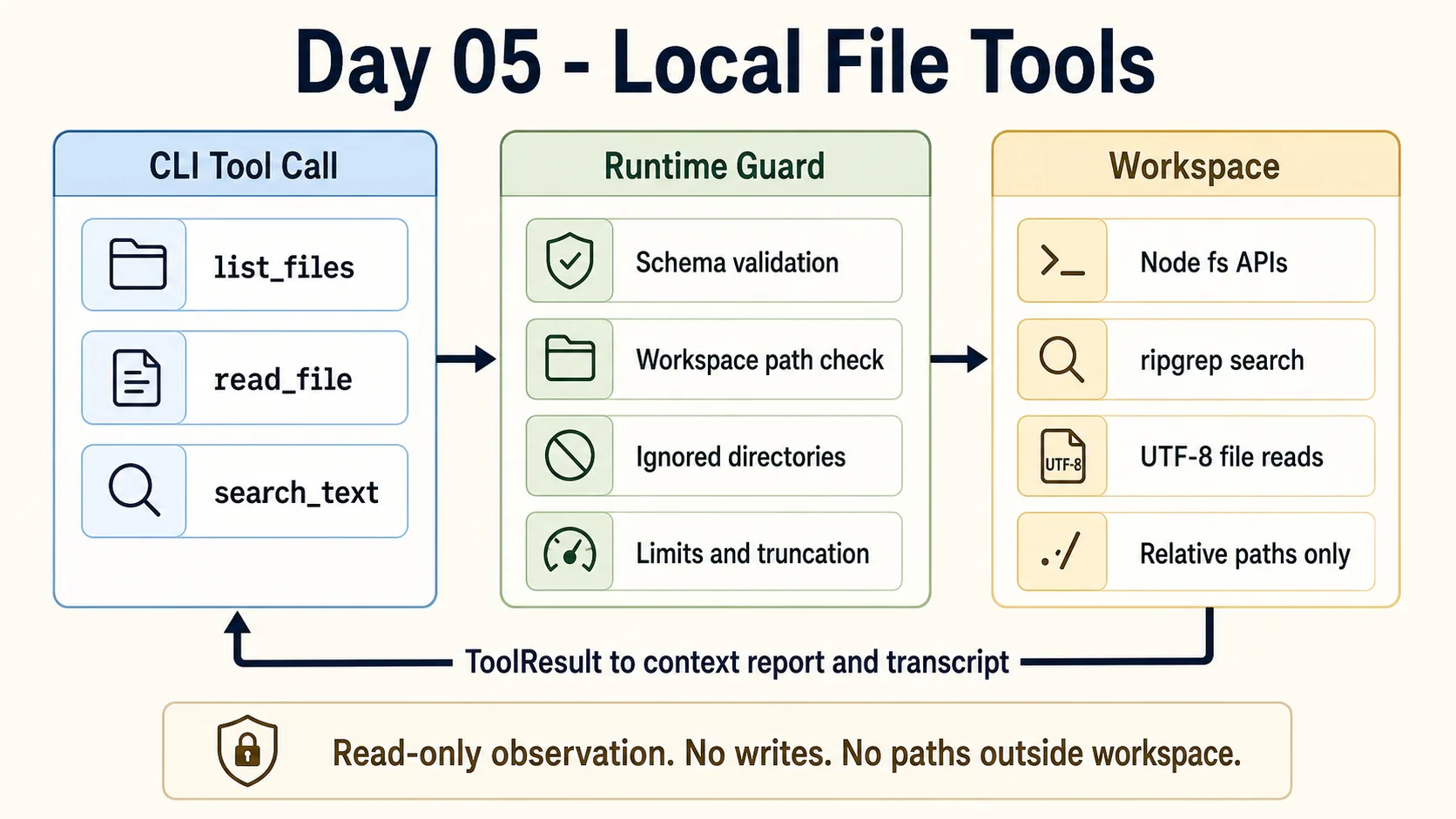
The boundary matters: today is read-only local observation. No writes, no arbitrary shell commands, and no access outside the workspace.
Design
1. Every Path Goes Through a Workspace Guard
The largest risk in local file tools is not code complexity. It is an unclear boundary.
If read_file can read any path on the machine, it is no longer a project-observation tool. It becomes a general local file-reading capability. Once an agent loop is added, that would be a dangerous default.
So every Day 05 file tool first resolves paths like this:
const resolvedPath = resolve(workspaceRoot, inputPath);
const relativePath = relative(workspaceRoot, resolvedPath);
If the path escapes the workspace, the tool fails:
[mini-harness] Error: Path is outside workspace: ../package.json2. list_files Filters Generated Directories by Default
list_files skips common large directories:
.gitnode_modulesdist.nextcoverage
It also supports two limits:
maxDepthlimit
This is not polish. It protects context. File lists grow quickly, especially in Node projects. Tools that can return large output need truncation from the beginning.
3. read_file Supports a Byte Limit
read_file returns:
{
  path,
  content,
  bytes,
  returnedBytes,
  truncated
}
By default it returns at most 40KB. Callers can pass maxBytes, but the value is still clamped to an upper bound.
This is still a simplified implementation. It assumes the target is a UTF-8 text file. Later we can add binary detection, file-type handling, and line-based reads.
4. search_text Prefers rg, Then Falls Back to Node
Text search tries rg first:
rg --line-number --no-heading --color never --fixed-strings ...The reason is practical: rg is fast enough for codebases and matches developer expectations.
But the demo should not fail completely if a machine does not have rg. The handler keeps a Node fallback that recursively reads text files and matches lines.
The returned structure is:
{
  root,
  query,
  matches: [
    { path, lineNumber, line }
  ],
  count,
  truncated
}
5. Day 05 Still Does Not Let the Model Call Tools Automatically
Every demo today still uses explicit --tool.
That is intentional. We are extending runtime capability, not building a model-driven agent loop yet. Day 06 will connect the “observe -> decide -> act -> observe” path.
Implementation Steps
1. Add a Local File Tools Module
File: apps/mini-harness/src/tools/local-files.ts
The module entrypoint is:
export function registerLocalFileTools(registry: ToolRegistry, workspaceRoot: string): void {
  const root = resolve(workspaceRoot);

  for (const tool of createLocalFileTools(root)) {
    registry.register(tool);
  }
}
It receives the registry and the workspace root, then registers three tools.
2. Implement list_files
The list_files schema:
{
  type: "object",
  properties: {
    path: { type: "string" },
    maxDepth: { type: "number" },
    limit: { type: "number" },
  },
}
Example:
npm run dev -- --tool list_files --tool-input '{"path":".","maxDepth":1,"limit":20}'Example output summary:
{
  "root": ".",
  "files": [
    { "path": "apps", "type": "directory" },
    { "path": "articles/day-05-local-file-tools.md", "type": "file", "size": 9426 }
  ],
  "count": 20,
  "truncated": true
}
3. Implement read_file
The read_file schema:
{
  type: "object",
  properties: {
    path: { type: "string" },
    maxBytes: { type: "number" },
  },
  required: ["path"],
}
Example:
npm run dev -- --tool read_file --tool-input '{"path":"README.md","maxBytes":1200}'The output includes content, total file bytes, returned bytes, and whether the result was truncated.
4. Implement search_text
The search_text schema:
{
  type: "object",
  properties: {
    query: { type: "string" },
    path: { type: "string" },
    limit: { type: "number" },
    caseSensitive: { type: "boolean" },
  },
  required: ["query"],
}
Example:
npm run dev -- --tool search_text --tool-input '{"query":"ToolRegistry","path":"apps/mini-harness/src","limit":10}'It returns matching lines:
{
  "matches": [
    {
      "path": "apps/mini-harness/src/tools/registry.ts",
      "lineNumber": 10,
      "line": "export class ToolRegistry {"
    }
  ]
}
5. Register the Tools in the Default Registry
File: apps/mini-harness/src/tools/registry.ts
createDefaultToolRegistry() now receives a workspace root and registers the local file tools:
export function createDefaultToolRegistry(workspaceRoot = process.env.INIT_CWD ?? process.cwd()): ToolRegistry {
  const registry = new ToolRegistry();

  registry.register(...echo);
  registerLocalFileTools(registry, workspaceRoot);

  return registry;
}
Demo
See: Day 05 demo
List files:
npm run dev -- --tool list_files --tool-input '{"path":".","maxDepth":1,"limit":20}'Read a file:
npm run dev -- --tool read_file --tool-input '{"path":"README.md","maxBytes":1200}'Search text:
npm run dev -- --tool search_text --tool-input '{"query":"ToolRegistry","path":"apps/mini-harness/src","limit":10}'Paths outside the workspace are rejected:
npm run dev -- --tool read_file --tool-input '{"path":"../package.json"}'Output:
[mini-harness] Error: Path is outside workspace: ../package.jsonCurrent System Capability
After Day 05, the mini harness has its first real observation tools:
list_filescan inspect the workspace file structure.read_filecan read text files.search_textcan search code and documentation.- Tool output still flows through
ToolResult. --context-reportand--transcriptcan record file observation results.- All local file access is constrained to the workspace.
Still missing:
- model-driven tool selection
- multi-step observe/action loops
- file writes or patches
- approval and sandboxing
- fuller binary-file and large-file handling
Problems Encountered
1. File Tools Need Stronger Boundaries Than a Mock Tool
If echo is called incorrectly, it returns the wrong result. If read_file is called incorrectly, it may read a file that should never enter model context.
So the point of Day 05 is not merely “can read files.” The point is “can only read files inside a clear boundary.”
2. Search Needs to Handle Missing rg
rg is the preferred path, but it should not be the only path. The Node fallback keeps the demo stable.
The fallback is not as fast as rg, and it does not implement full ignore-rule behavior. It only preserves the smallest useful capability.
3. Truncation Is Not Optional
Local file tool output will eventually enter model context. Any tool that returns a large amount of text needs limit, maxBytes, and truncated.
Otherwise, Day 08’s context builder will be forced to manage tool-output explosions after the fact.
Tomorrow
Day 06 will implement the Agent Loop.
At that point, the model will no longer only answer text, and we will no longer need to call tools manually with --tool. It will enter the smallest loop:
observe -> decide -> act -> observe -> finalToday’s three local file tools will become the first observation tools inside that loop.
Comments