上一篇:Day 04 - Tool Registry / 工具注册表
English version: Day 05 - Local File Tools
文章介绍
Day 04 我们实现了 Tool Registry:工具有公开 schema,runtime 持有 handler,CLI 可以用 --tool 手动 dispatch。
但 echo 只是 mock tool。它证明工具链路能跑,却不能帮助 agent 理解真实代码库。
Day 05 开始加入第一组真正有用的 coding agent 工具:本地文件观察工具。
今天仍然不做写文件、不做 patch、不做 shell command。范围刻意收窄到只读能力:
- 列出 workspace 里的文件
- 读取 workspace 里的文本文件
- 搜索 workspace 里的文本内容
这三个工具是后面所有 agent 行为的基础。一个 coding agent 在修改代码前,必须先知道项目里有什么、文件内容是什么、相关符号在哪里出现。
今天要解决什么
今天要完成四个交付:
- 实现
list_files:列出 workspace 内文件和目录。 - 实现
read_file:读取 UTF-8 文本文件,并支持 byte limit。 - 实现
search_text:搜索文本并返回匹配行。 - 把三个工具注册进默认 Tool Registry。
Demo 仍然走 Day 04 加入的手动工具入口:
npm run dev -- --tool list_files --tool-input '{"path":".","maxDepth":1,"limit":20}'
npm run dev -- --tool read_file --tool-input '{"path":"README.md","maxBytes":1200}'
npm run dev -- --tool search_text --tool-input '{"query":"ToolRegistry","path":"apps/mini-harness/src","limit":10}'
它在 Cursor/Codex 里对应哪一层
今天实现的是 local observation tools。
Cursor、Codex、Claude Code 这类 coding agent 在真正修改代码前,都会先做观察:
What files exist?
What does this file contain?
Where is this symbol mentioned?
Which module owns this behavior?
这些问题不能只靠模型的训练数据回答。它们必须来自当前 workspace。
Day 05 的位置如下:
User
  -> CLI surface
    -> ToolRegistry
      -> list_files
      -> read_file
      -> search_text
    -> workspace path guard
    -> Node fs / ripgrep
    -> ToolResult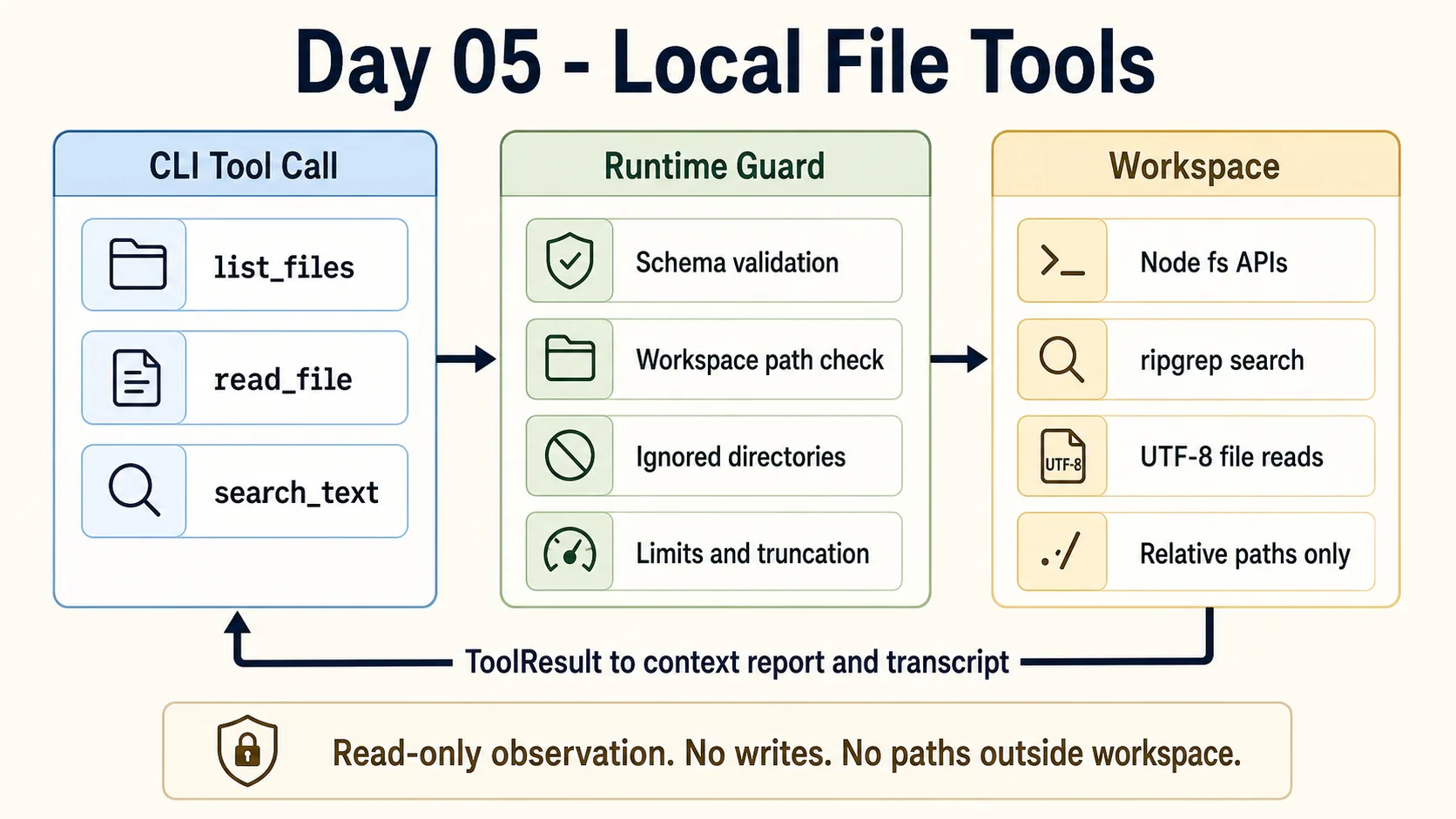
注意今天的边界:只读本地观察,不写文件,不执行任意 shell command,不允许访问 workspace 外部路径。
设计思路
1. 所有路径都先过 workspace guard
本地文件工具最大的风险不是代码复杂度,而是边界不清。
如果 read_file 可以读取任意路径,那它就不再是“项目观察工具”,而是一个泛化本机文件读取能力。后续加入 agent loop 后,这会变成非常危险的默认能力。
所以 Day 05 每个文件工具都会先做:
const resolvedPath = resolve(workspaceRoot, inputPath);
const relativePath = relative(workspaceRoot, resolvedPath);
只要路径逃出 workspace,就直接报错:
[mini-harness] Error: Path is outside workspace: ../package.json2. list_files 默认过滤生成目录
list_files 会跳过常见的大目录:
.gitnode_modulesdist.nextcoverage
它还支持两个限制:
maxDepthlimit
这不是为了精致,而是为了保护 context。文件列表很容易爆炸,尤其是 Node 项目。工具必须从第一天就有截断意识。
3. read_file 支持 byte limit
read_file 返回:
{
  path,
  content,
  bytes,
  returnedBytes,
  truncated
}
默认最多返回 40KB,调用方可以传 maxBytes,但也会被 clamp 到上限。
这里仍然是一个简化实现:它假设目标是 UTF-8 文本文件。后面如果要支持二进制检测、文件类型识别、按行读取,可以继续扩展。
4. search_text 优先使用 rg,失败后 fallback 到 Node
文本搜索优先调用 rg:
rg --line-number --no-heading --color never --fixed-strings ...原因很简单:rg 对代码库搜索足够快,也符合开发者直觉。
但 demo 不应该因为机器上没有 rg 就完全不可用。所以 handler 里保留了 Node fallback:递归读取文本文件并逐行匹配。
返回结构是:
{
  root,
  query,
  matches: [
    { path, lineNumber, line }
  ],
  count,
  truncated
}
5. Day 05 仍然不让模型自动调用工具
今天所有 demo 还是显式 --tool。这点很重要。
我们现在只是在扩展 runtime 能力,还没有实现模型驱动的 agent loop。Day 06 才会把“观察 -> 决策 -> 行动 -> 再观察”接起来。
实现步骤
1. 新增 local file tools 模块
文件:apps/mini-harness/src/tools/local-files.ts
模块入口是:
export function registerLocalFileTools(registry: ToolRegistry, workspaceRoot: string): void {
  const root = resolve(workspaceRoot);

  for (const tool of createLocalFileTools(root)) {
    registry.register(tool);
  }
}
它接收 registry 和 workspace root,然后注册三个工具。
2. 实现 list_files
list_files 的 schema:
{
  type: "object",
  properties: {
    path: { type: "string" },
    maxDepth: { type: "number" },
    limit: { type: "number" },
  },
}
示例:
npm run dev -- --tool list_files --tool-input '{"path":".","maxDepth":1,"limit":20}'返回摘要:
{
  "root": ".",
  "files": [
    { "path": "apps", "type": "directory" },
    { "path": "articles/day-05-local-file-tools.md", "type": "file", "size": 9426 }
  ],
  "count": 20,
  "truncated": true
}
3. 实现 read_file
read_file 的 schema:
{
  type: "object",
  properties: {
    path: { type: "string" },
    maxBytes: { type: "number" },
  },
  required: ["path"],
}
示例:
npm run dev -- --tool read_file --tool-input '{"path":"README.md","maxBytes":1200}'返回会包含 content、文件总字节数、实际返回字节数和是否截断。
4. 实现 search_text
search_text 的 schema:
{
  type: "object",
  properties: {
    query: { type: "string" },
    path: { type: "string" },
    limit: { type: "number" },
    caseSensitive: { type: "boolean" },
  },
  required: ["query"],
}
示例:
npm run dev -- --tool search_text --tool-input '{"query":"ToolRegistry","path":"apps/mini-harness/src","limit":10}'返回匹配行:
{
  "matches": [
    {
      "path": "apps/mini-harness/src/tools/registry.ts",
      "lineNumber": 10,
      "line": "export class ToolRegistry {"
    }
  ]
}
5. 注册到默认 registry
文件:apps/mini-harness/src/tools/registry.ts
createDefaultToolRegistry() 现在接收 workspace root,并注册本地文件工具:
export function createDefaultToolRegistry(workspaceRoot = process.env.INIT_CWD ?? process.cwd()): ToolRegistry {
  const registry = new ToolRegistry();

  registry.register(...echo);
  registerLocalFileTools(registry, workspaceRoot);

  return registry;
}
Demo
详见:Day 05 demo
列文件:
npm run dev -- --tool list_files --tool-input '{"path":".","maxDepth":1,"limit":20}'读文件:
npm run dev -- --tool read_file --tool-input '{"path":"README.md","maxBytes":1200}'搜文本:
npm run dev -- --tool search_text --tool-input '{"query":"ToolRegistry","path":"apps/mini-harness/src","limit":10}'越界路径会被拒绝:
npm run dev -- --tool read_file --tool-input '{"path":"../package.json"}'输出:
[mini-harness] Error: Path is outside workspace: ../package.json当前系统能力变化
Day 05 之后,mini harness 有了第一组真实观察工具:
list_files能看到 workspace 文件结构。read_file能读取文本文件。search_text能搜索代码和文档。- 工具结果会继续走
ToolResult。 --context-report和--transcript可以记录文件观察结果。- 所有本地文件访问都限制在 workspace 内。
还没有实现的能力:
- 模型自动决定调用哪个工具。
- 多步观察和行动循环。
- 写文件或 patch。
- approval/sandbox。
- 更完整的二进制文件和超大文件处理。
遇到的问题
1. 文件工具比 mock tool 更需要边界
echo 调错了最多返回错误结果。read_file 调错了可能读取到不该进入上下文的文件。
所以 Day 05 的重点不是“能读文件”,而是“只能在明确边界内读文件”。
2. 搜索工具要处理 rg 不存在的情况
rg 是首选,但不应该是唯一执行路径。Node fallback 让 demo 更稳定。
当然,fallback 没有 rg 快,也没有完整忽略规则。它只是保证最小能力可用。
3. 截断不是可选项
本地文件工具的输出最终会进入模型上下文。任何返回大量文本的工具,都必须有 limit、maxBytes 和 truncated。
否则 Day 08 做 context builder 时会非常被动。
明天做什么
Day 06 会实现 Agent Loop。
到那时,模型不再只是回答文本,也不再需要我们手动 --tool。它会进入最小循环:
observe -> decide -> act -> observe -> final今天的三个本地文件工具会成为这个循环里的第一批 observation tools。
Comments