Previous article: Day 03 - LLM Chat Loop
Next article: Day 05 - Local File Tools
中文版:Day 04:Tool Registry / 工具注册表
Introduction
On Day 03, we connected the minimal chat loop: the CLI turns the user task into system/user messages, sends them to a model provider, and receives an assistant message.
But an agent with only a chat loop is still stuck at the “can talk” stage. Coding agents become useful because they can read files, search code, execute commands, generate diffs, request approvals, and write patches. Inside the harness, all of these capabilities first need to be modeled as tools.
Day 04 does not build real file tools yet, and it does not let the model decide which tool to call. Today only lays the first foundation for the tool layer: the Tool Registry.
The Tool Registry answers a very practical set of questions:
- What tools exist?
- What input does each tool need?
- What schema should the model see?
- When the runtime receives a tool name and arguments, how does it find the handler?
- Where should unknown tool errors, invalid arguments, and handler failures appear?
What Are We Solving Today?
Today has four deliverables:
- Define the public tool schema:
name,description, andinputSchema. - Define the internal registered tool: public schema + handler.
- Implement
register(),list(), anddispatch(). - Add the first mock tool:
echo.
We also add a manual tool-call entrypoint to the CLI:
npm run dev -- --tool echo --tool-input '{"text":"hello"}'This command is not an agent loop. It only proves that the registry can dispatch from a tool name to a handler and return a structured result.
Where Does This Fit in Cursor/Codex?
Today implements the tool definition layer and the smallest tool runtime.
In systems such as Cursor, Codex, and Claude Code, the tool layer usually serves two sides:
Model side
  -> sees tool name, description, JSON schema

Runtime side
  -> owns handler, validation, dispatch, errors, result logging
The model should not see the handler. A handler may read files, execute commands, or write patches. Those are real runtime capabilities.
The runtime also cannot rely only on natural-language tool descriptions. It needs stable schemas and a dispatch table. Otherwise, once dozens of tools are added, every call becomes fragile if/else logic.
Day 04 sits here:
User
  -> CLI surface
    -> chat loop
    -> tool registry
      -> tool schema list
      -> manual dispatch
      -> echo handler
    -> context report / transcript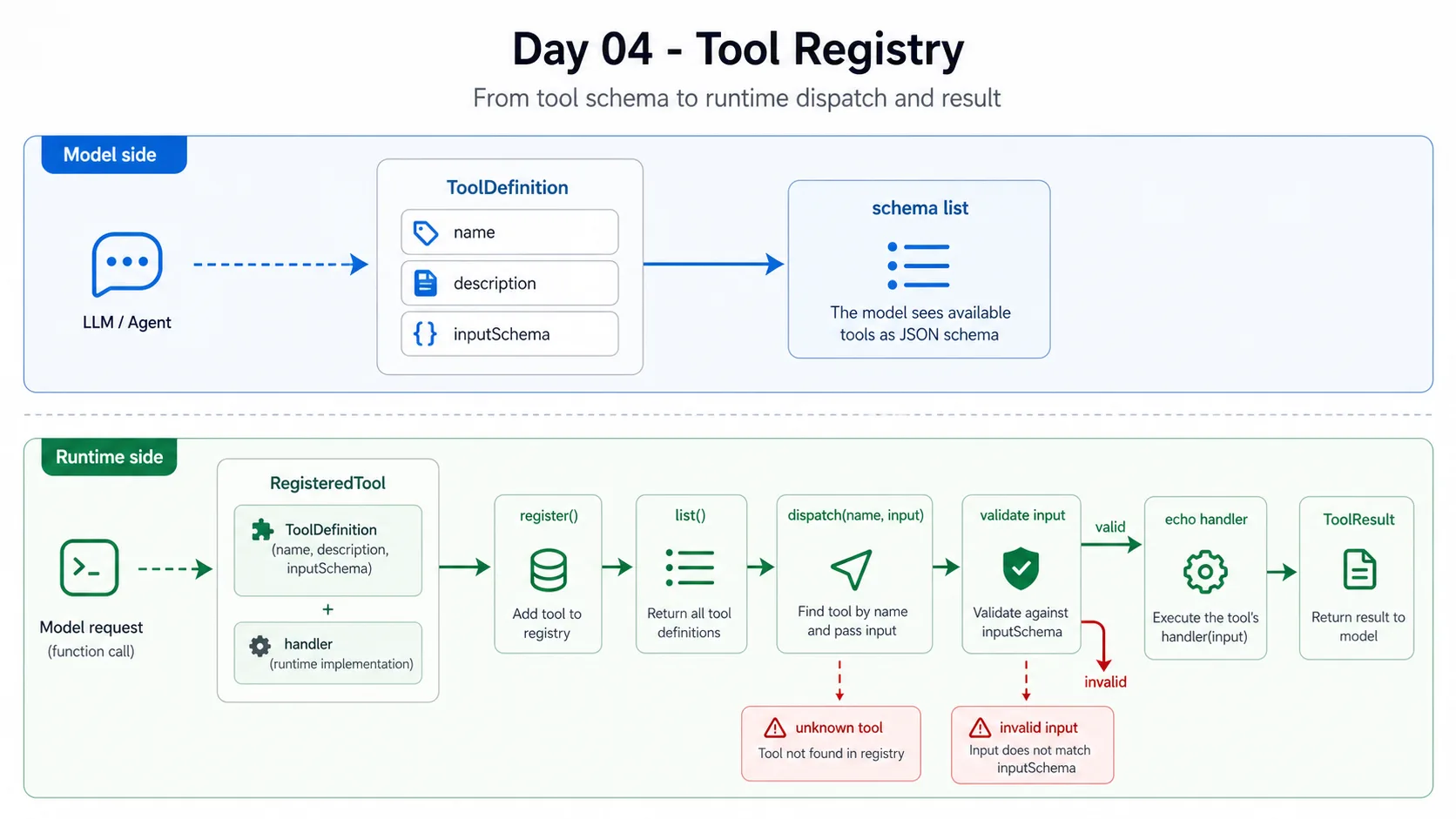
The diagram shows the Day 04 tool registry flow: the model side only sees ToolDefinition and the schema list; the runtime side stores RegisteredTool, which is the public definition plus the real handler. Manual dispatch looks up the tool by name, validates input, executes the handler, and returns a structured ToolResult.
Day 06 will connect this line into the agent loop, so the model can decide whether to call a tool. Today we only make the runtime capable of calling one.
Design
1. ToolDefinition Is for the Model
The shared package already has ToolDefinition:
export type ToolDefinition = {
  name: string;
  description: string;
  inputSchema: JsonSchema;
};
This part enters the context report today, and later it will describe the tools available to the model.
For echo, the public definition is:
{
  name: "echo",
  description: "Return the provided input. Used as the first mock tool before real file tools exist.",
  inputSchema: {
    type: "object",
    properties: {
      text: { type: "string" },
    },
    required: ["text"],
  },
}
This deliberately uses JSON Schema style instead of TypeScript types. Model APIs, MCP, plugin systems, and many agent runtimes tend to describe tool input with JSON Schema.
2. RegisteredTool Is Internal Runtime State
The runtime needs one extra thing that the model should not see: the handler.
export type ToolHandler = (input: unknown) => Promise<unknown> | unknown;

export type RegisteredTool = ToolDefinition & {
  handler: ToolHandler;
};
The handler is not exposed to the model. When list() returns tool definitions, it strips the handler:
list(): ToolDefinition[] {
  return [...this.tools.values()].map(({ handler: _handler, ...definition }) => definition);
}
This boundary matters. The model only proposes “which tool to call and with what arguments.” The runtime performs the actual execution.
3. dispatch() Returns a Structured Result
Day 04’s dispatch() does not return only the handler output. It returns a ToolResult:
export type ToolResult = {
  name: string;
  input: unknown;
  output: unknown;
  durationMs: number;
};
This creates room for later transcript logging. A tool call should at least know:
- which tool was called
- what input was passed
- what output came back
- how long it took
Day 07 will split these results further into JSONL events.
4. Start with a Small Schema Validator
A full JSON Schema validator can become complex. Day 04 does not add another dependency. It implements a small subset:
- object
- array
- string
- number
- boolean
- null
- required fields
- nested properties
That is enough for echo, and enough to keep extending into Day 05’s list_files, read_file, and search_text.
If input does not match the schema, the runtime throws a clear error:
[mini-harness] Error: Invalid input for echo: missing required property "text"
[mini-harness] Error: Invalid input for echo.text: expected string
Implementation Steps
1. Extend Shared Types
File: packages/shared/src/types.ts
Day 04 extends the JsonSchema type list and adds ToolCall / ToolResult:
export type ToolCall = {
  name: string;
  input: unknown;
};

export type ToolResult = {
  name: string;
  input: unknown;
  output: unknown;
  durationMs: number;
};
The shared package now contains:
- model message types:
ChatMessage - tool definition type:
ToolDefinition - tool call/result types:
ToolCall,ToolResult
2. Implement ToolRegistry
File: apps/mini-harness/src/tools/registry.ts
Core structure:
export class ToolRegistry {
  private readonly tools = new Map<string, RegisteredTool>();

  register(tool: RegisteredTool): void {
    if (this.tools.has(tool.name)) {
      throw new Error(`Tool already registered: ${tool.name}`);
    }
    this.tools.set(tool.name, tool);
  }

  list(): ToolDefinition[] {
    return [...this.tools.values()].map(({ handler: _handler, ...definition }) => definition);
  }

  async dispatch(name: string, input: unknown): Promise<ToolResult> {
    const tool = this.tools.get(name);
    if (!tool) {
      throw new Error(`Unknown tool: ${name}`);
    }
    validateInput(tool.inputSchema, input, name);

    const startedAt = performance.now();
    const output = await tool.handler(input);

    return {
      name,
      input,
      output,
      durationMs: Math.round(performance.now() - startedAt),
    };
  }
}
Three decisions here are deliberate:
- Registering the same tool name twice throws.
list()never exposes handlers.dispatch()validates input before executing the handler.
3. Register the echo Mock Tool
createDefaultToolRegistry() now registers an echo tool:
registry.register({
  name: "echo",
  description: "Return the provided input. Used as the first mock tool before real file tools exist.",
  inputSchema: {
    type: "object",
    properties: {
      text: { type: "string" },
    },
    required: ["text"],
  },
  handler: (input: unknown) => input,
});
This tool has no product value, but it is perfect for validating the tool path. It exposes every critical point:
- whether schema enters the context
- whether JSON input can be parsed
- whether the registry can find the tool
- whether the handler executes
- whether the result enters transcript/context report
4. Add a Manual Tool Call Entrypoint to the CLI
File: apps/mini-harness/src/cli.ts
Two arguments were added:
--tool echo
--tool-input '{"text":"hello"}'
Command:
npm run dev -- --tool echo --tool-input '{"text":"hello"}'Output includes:
[mini-harness] Tool result: {"name":"echo","input":{"text":"hello"},"output":{"text":"hello"},"durationMs":0}If --context-report is also enabled, the tool result becomes a tool-results context part. Because this is a manual tool-dispatch demo, it does not call the model, so the tool-only run shows provider as none.
Demo
The full demo record lives in demos/day-04/README.md in the project repository.
Manual echo call:
npm run dev -- --tool echo --tool-input '{"text":"hello"}'With context report:
npm run dev -- --context-report --tool echo --tool-input '{"text":"hello"}'Invalid input example:
npm run dev -- --tool echo --tool-input '{"text":123}'Expected error:
[mini-harness] Error: Invalid input for echo.text: expected stringWhat Changed in the System?
After Day 04, the system has these new capabilities:
- CLI run summary continues to include tool definitions in context.
- The runtime has an extensible
ToolRegistry. - Tool registration and public tool definitions are separated.
- Manual CLI arguments can trigger tool dispatch.
- Tool input goes through minimal schema validation.
- Tool execution returns a structured
ToolResult. - Transcripts can include tool execution results.
Still missing:
- model-selected tool calls
- multi-step agent loop
- structured event logs for tool failures
- real file tools
- approval/sandbox
Problems Encountered
1. Do Not Turn Day 04 into a Fake Agent Loop
It would be tempting to write a natural-language match such as “if the user says echo, call echo.” But that would push the harness in the wrong direction.
The real agent loop should let the model output tool-call intent, and then let the runtime execute that tool. Day 04 is not there yet, so the CLI only exposes an explicit --tool parameter as the demo entrypoint.
2. Keep JSON Schema Scope Small
Full JSON Schema includes many features: oneOf, enum, additionalProperties, minimum, format, and more. None of that is needed today.
Implementing a full schema validator too early would shift the article away from agent harness design and into schema details. Today only implements the subset Day 04 needs.
3. Tool Results Should Be Structured from the Start
If dispatch() returned only the handler output, transcript support would later have to re-wrap the call details. Returning ToolResult now makes later extension more natural.
Tomorrow
Day 05 will implement local file tools:
list_filesread_filesearch_text
At that point, echo moves back into a test/example role, and the registry starts carrying genuinely useful coding-agent tools.
Comments