Previous article: Day 02 - Project Scaffold
Next article: Day 04 - Tool Registry
中文版:Day 03:LLM Chat Loop / 最小对话循环
Introduction
On Day 02, we set up the TypeScript workspace, CLI entrypoint, context report placeholder, and transcript placeholder. That CLI did not call a model yet. It only printed a scaffold summary.
Day 03 enters the core data flow of a coding agent: take the user task, organize it into chat messages, send those messages to a model provider, then bring the assistant message back into the harness.
We are not implementing tool calls today. We are also not building a multi-step agent loop yet. The reason is simple: before adding a tool registry, file tools, approval, or patch editing, we need to stabilize the smallest boundary around model calls. Otherwise, every later capability will end up mixed into cli.ts, making the system hard to test and hard to switch across model providers.
What Are We Solving Today?
Today has four deliverables:
- Define three chat message roles:
system,user, andassistant. - Define a
ModelProviderinterface so the harness is not tied to one model API. - Implement a default mock provider so the demo still works without an API key.
- Implement an OpenAI-compatible non-streaming provider, with DeepSeek V4 Pro as the default real-model example.
Run it with:
npm run dev -- "explain what an agent harness is"
npm run dev -- --context-report "explain what an agent harness is"
npm run dev -- --transcript logs/runs/day-03.jsonl "explain what an agent harness is"
If neither OPENCODE_API_KEY nor OPENAI_API_KEY is configured, the CLI uses the local mock provider. If OPENCODE_API_KEY is configured, the CLI calls opencode Go’s OpenAI-compatible /chat/completions API, using deepseek-v4-pro by default.
The opencode Go plan can call DeepSeek V4 Pro. If you only want to try a coding-agent tool first, opencode is the direct path; if you want to understand how a harness connects to a model, this article breaks down the provider layer.
Where Does This Fit in Cursor/Codex?
Today implements the model adapter and the smallest form of conversation state.
In products such as Cursor, Codex, and Claude Code, model calls usually are not scattered directly across UI or CLI code. A harness layer sits in between and turns inputs into a structure the model can understand:
- system prompt
- user request
- conversation history
- tool definitions
- selected context
- safety/rules guidance
Day 03 only includes the minimal set:
User
  -> CLI surface
    -> system message
    -> user message
    -> model provider
    -> assistant message
    -> context report / transcript
Tool definitions still only appear in the context report today. They are not callable by the model yet. The real tool registry starts on Day 04.
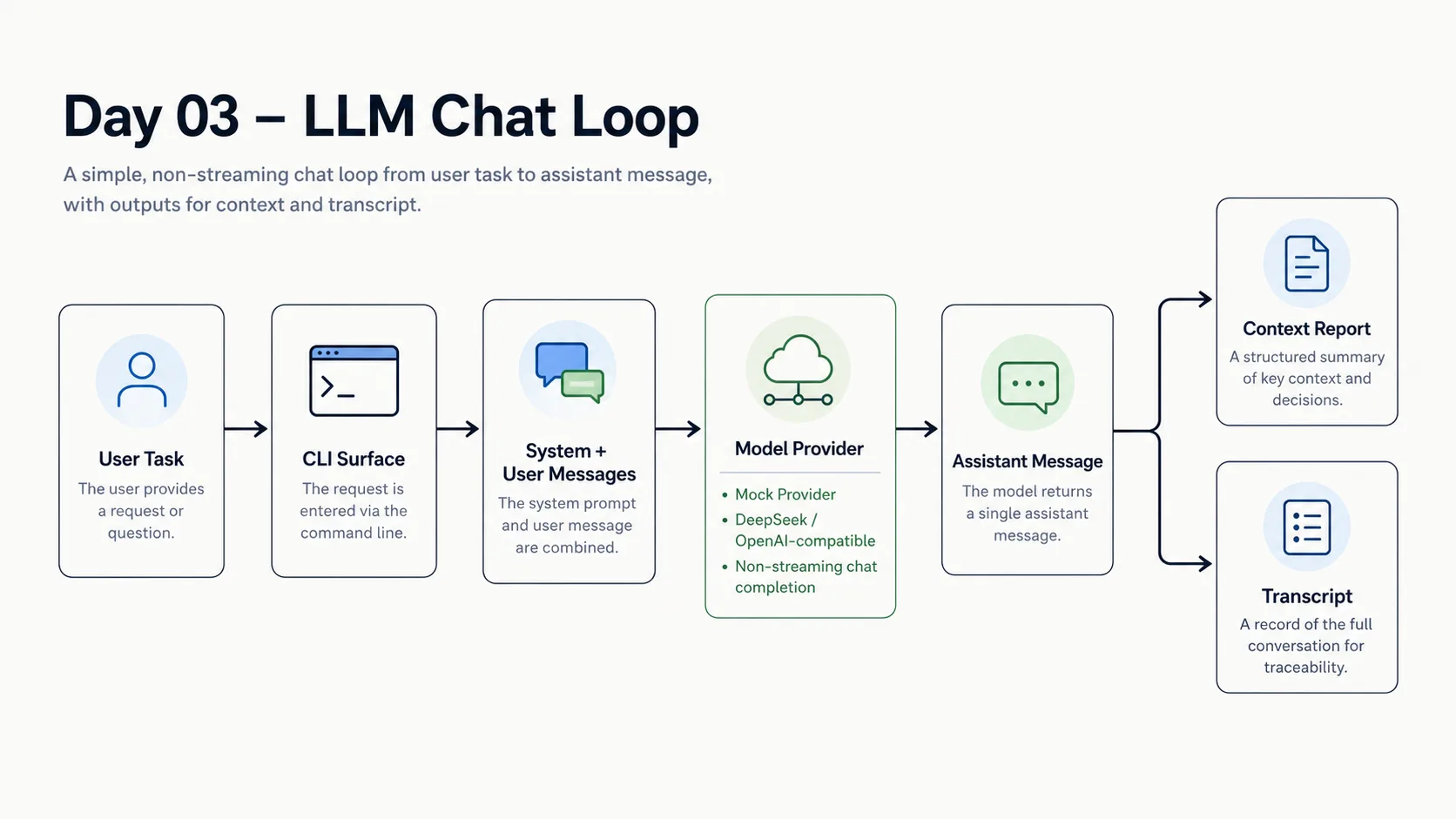
The image above shows the minimal Day 03 chat loop: a user task enters the CLI, becomes system/user messages, goes through a model provider, and returns as an assistant message. The provider can be local mock, DeepSeek, or another OpenAI-compatible API. The assistant message then becomes part of the context report and transcript.
Design
1. Messages Are the Basic Currency of the Harness
The shared package adds a minimal message type:
export type ChatRole = "system" | "user" | "assistant";

export type ChatMessage = {
  role: ChatRole;
  content: string;
};
This structure is plain, but it is the entrypoint for later capabilities. Tool results, file summaries, rules, and compressed history will all eventually become some form of model context. Today we only make the message line work.
2. The Provider Interface Lives in the App Runtime
apps/mini-harness/src/model/provider.ts defines the provider interface:
export type ModelProvider = {
  name: string;
  chat(messages: ChatMessage[]): Promise<ChatMessage>;
};
The CLI does not care whether the underlying provider is mock, OpenAI, an OpenAI-compatible API, or a future local model. It only knows this: give the provider a list of messages, get one assistant message back.
This abstraction has two direct benefits:
- The Day 03 demo can run reliably without network access or API keys.
- Switching model providers later does not require changes to the CLI, context report, or transcript data structures.
3. Use a Mock Provider by Default
Real LLM calls introduce three variables: API key, network access, and provider response format. For a teaching harness, if the first demo command requires an external service, readers can get blocked by environment setup before they understand the architecture.
So today’s default behavior is:
No OPENCODE_API_KEY / OPENAI_API_KEY -> mock provider
OPENCODE_API_KEY exists              -> opencode Go / DeepSeek V4 Pro provider
OPENAI_API_KEY exists                -> OpenAI-compatible fallback provider
The mock provider does not pretend to be intelligent. It returns deterministic text to prove that the chat loop data flow is connected:
[mini-harness] Model provider: mock
[mini-harness] Mock model response:
4. Configure DeepSeek V4 Pro with .env
The main real-model example uses DeepSeek V4 Pro through opencode Go. opencode Go exposes an OpenAI-compatible chat completions endpoint, so the harness still only needs one OpenAI-compatible provider.
The project root includes .env.example:
OPENCODE_API_KEY=
OPENCODE_BASE_URL=https://opencode.ai/zen/go/v1
MINI_HARNESS_MODEL=deepseek-v4-pro
Copy it before running the real-model demo:
cp .env.example .envThen fill in OPENCODE_API_KEY. The Day 03 CLI reads environment variables, so load .env into the current shell before running:
set -a
source .env
set +a
npm run dev -- "explain what an agent harness is"
Only OPENCODE_API_KEY is required. OPENCODE_BASE_URL and MINI_HARNESS_MODEL have defaults. The code appends /chat/completions to the base URL, so the base value should be https://opencode.ai/zen/go/v1; the full request endpoint becomes https://opencode.ai/zen/go/v1/chat/completions.
Keeping OPENAI_API_KEY / OPENAI_BASE_URL shows that the provider layer is not tied to a single vendor. But the article and demo use DeepSeek V4 Pro as the main path. If you want a coding-agent plan that can call DeepSeek V4 Pro, take a look at the opencode Go plan.
The provider uses non-streaming /chat/completions. Day 03 does not implement streaming yet because streaming changes terminal output, error handling, and transcript recording. First we stabilize the boundary of one request and one response. More detailed execution logs can come after Day 07.
Implementation Steps
1. Define ChatMessage in the Shared Package
File: packages/shared/src/types.ts
export type ChatRole = "system" | "user" | "assistant";

export type ChatMessage = {
  role: ChatRole;
  content: string;
};
This lets the app runtime and later shared helpers reuse the same message type.
2. Add a Model Provider
File: apps/mini-harness/src/model/provider.ts
Core interface:
export type ModelProvider = {
  name: string;
  chat(messages: ChatMessage[]): Promise<ChatMessage>;
};
createModelProviderFromEnv() checks environment variables in order:
- If
OPENCODE_API_KEYexists: return the opencode Go provider, defaulting todeepseek-v4-pro. - If there is no opencode key but
OPENAI_API_KEYexists: return the OpenAI-compatible fallback provider. - If neither exists: return the mock provider.
The real provider sends:
{
  "model": "deepseek-v4-pro",
  "messages": [...],
  "temperature": 0.2
}
Then it converts choices[0].message.content into the harness’s internal assistant message.
3. Upgrade the Run Summary into a Chat Run
File: apps/mini-harness/src/agent/run.ts
On Day 02, createRunSummary returned a fixed scaffold message. On Day 03, it starts building a real conversation:
const messages: ChatMessage[] = [
  {
    role: "system",
    content: systemPrompt,
  },
  {
    role: "user",
    content: input.task,
  },
];

const assistantMessage = await input.provider.chat(messages);
const conversation = [...messages, assistantMessage];
The returned result now includes:
providermessages- assistant
message - a context part containing the full conversation
That also means --context-report now shows the full conversation, not only the user input.
4. Update CLI Output
File: apps/mini-harness/src/cli.ts
The CLI now creates a provider and prints the provider name:
[mini-harness] Task: explain what an agent harness is
[mini-harness] Model provider: mock
[mini-harness] Mock model response:
If --transcript is enabled, the JSONL record also includes the provider, messages, context parts, and summary output.
Demo
The full demo record lives in demos/day-03/README.md in the project repository.
Default mock provider:
npm run dev -- "explain what an agent harness is"Output summary:
[mini-harness] Task: explain what an agent harness is
[mini-harness] Model provider: mock
[mini-harness] Mock model response:

I received the user task: explain what an agent harness is
Context report:
npm run dev -- --context-report "explain what an agent harness is"The output includes:
Context Explorer

System prompt          ~...
Tool definitions       ~...
Conversation           ~...
Total                  ~...
Real model call:
set -a
source .env
set +a
npm run dev -- "explain what an agent harness is"
What Changed in the System?
After Day 03, the CLI has moved from static scaffold output to a minimal chat loop:
- It can construct system/user messages.
- It can get an assistant message from a provider.
- It can run offline when there is no API key.
- It can call DeepSeek V4 Pro through opencode Go when
OPENCODE_API_KEYis available. - The context report and transcript record the full conversation instead of a single task string.
Still missing:
- streaming output
- tool calls
- multi-step agent loop
- retry/backoff
- token budget trimming
- structured error transcript
Problems Encountered
1. Real Models Conflict with Reproducible Demos
The code should run immediately after readers clone the project, but real LLM calls depend on external services. The tradeoff here is to use mock by default and only use a real provider when a key is explicitly configured.
This is not the final product shape, but it works well for a teaching project. Every day’s code increment should be independently verifiable.
2. Do Not Overcomplicate the Provider Too Early
Today’s ModelProvider has only one method: chat(). It does not include streaming, tool choice, JSON mode, or response metadata yet. The reason is simple: none of those capabilities are needed today.
The interface should leave room for later, but it should not make us pay for future complexity too early.
3. Transcript Is Still Not an Execution Log
Today’s transcript is still one summary JSONL line, not the full event log planned for Day 07. For now, it only proves that the key chat run structure can be persisted.
Tomorrow
Day 04 will implement the Tool Registry.
At that point, the model context will contain not only system/user/assistant messages, but also tool definitions. The harness will need to answer two questions:
- What tools are available?
- When the model asks to call a tool, how does the runtime find and execute the corresponding handler?
Comments