Previous article: Day 01 - What Is an Agent Harness
中文版:Day 02:Project Scaffold / 项目骨架
Introduction
On Day 01, we clarified the boundary of an Agent Harness: the model generates the next step, while the harness organizes the user task, context, tools, safety policy, and execution records.
Day 02 is where we start writing code. But we are not calling a model yet, and we are not executing real tools yet. Today has one basic but important goal: set up the project scaffold and make a minimal CLI runnable.
That may sound like setup work, but for a coding agent project, the scaffold is not just a random folder layout. Over the next few days, we will add:
- agent loop
- tool registry
- file tools
- context builder
- transcript logging
- approval and sandbox
- patch editing
- project rules
Without clear package boundaries and a clear entrypoint, all of that code can quickly collapse into one oversized cli.ts. So the Day 02 goal is to create a TypeScript + npm workspaces project that can keep growing.
What Are We Solving Today?
Today has four deliverables:
- The repository root is an npm workspace.
apps/mini-harnessis the first runnable CLI app.packages/sharedcontains shared types, logger helpers, and token utilities.- The CLI supports a few minimal commands:
npm run dev -- "hello"
npm run dev -- --context-report "read package structure"
npm run dev -- --transcript logs/runs/day-02.jsonl "hello"
This CLI does not call a real LLM yet. It only accepts a task, prints scaffold status, and optionally prints a simplified context report. This output is a placeholder for the future agent loop: first make the data flow work, then replace the internals step by step.
Where Does This Fit in Cursor/Codex?
Today we are implementing the outermost CLI surface and the most basic runtime shell.
In products such as Cursor, Codex, and Claude Code, the first thing the user interacts with is not the model. It is the product entrypoint:
- How are CLI arguments parsed?
- Where does the task text enter the system?
- Should a debug report be enabled?
- Should a transcript be written?
- How are workspace modules loaded?
- How is the result of a run returned to the terminal?
None of these are model capabilities, but they decide whether the harness can reliably carry the features we add later.
At a high level, Day 02 builds this layer:
User
  -> CLI surface
    -> run summary placeholder
    -> context report placeholder
    -> transcript placeholder
Over the next few days, the run summary placeholder will be replaced by real model calls, tool calls, and the agent loop.
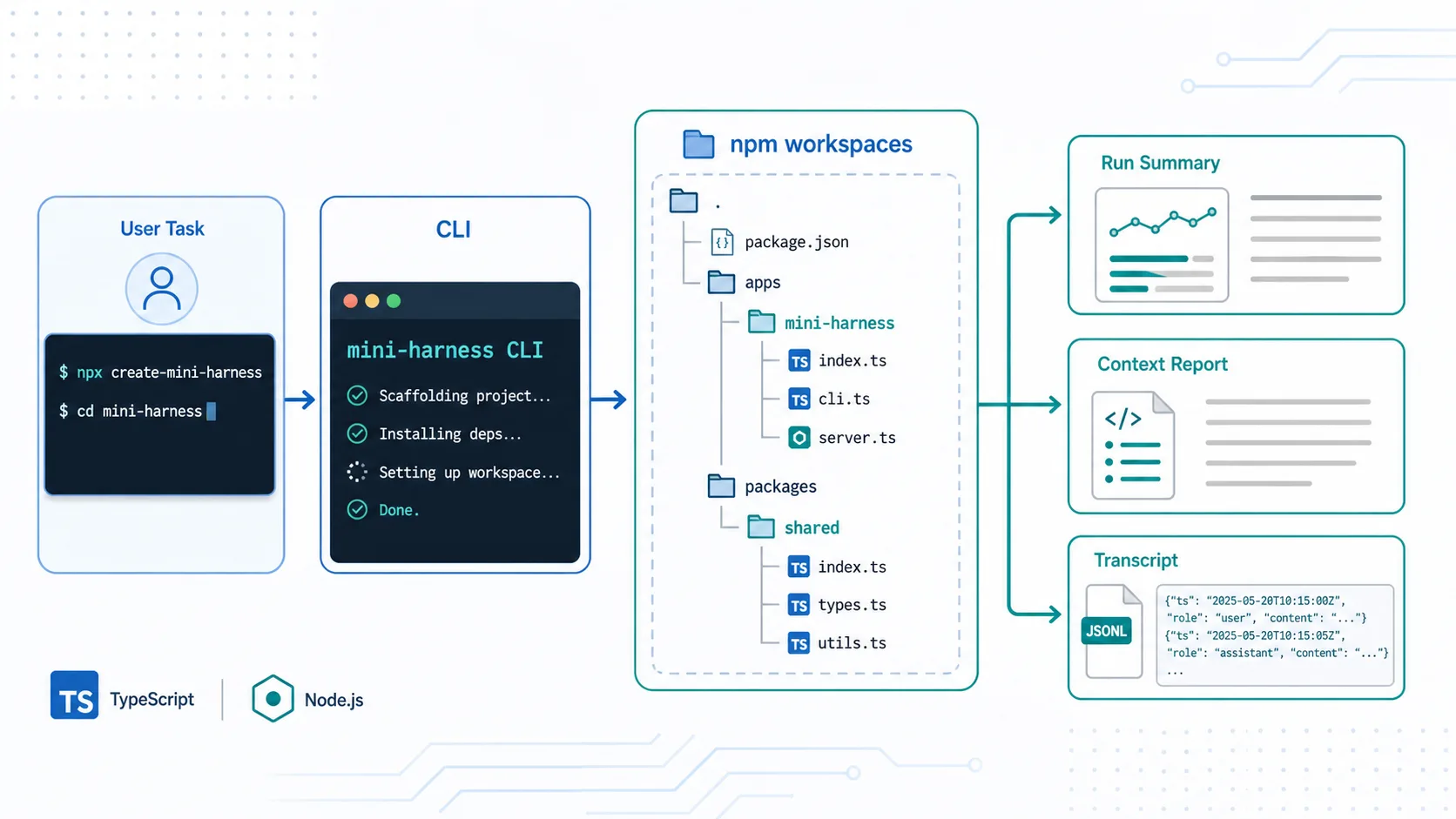
The image above illustrates the Day 02 flow: the user task enters the CLI surface, the CLI organizes the task through the mini-harness app and shared package inside npm workspaces, and the scaffold produces a run summary, context report, and transcript.
Design
1. Separate the App and Shared Package with npm Workspaces
The root package.json declares workspaces and common scripts:
{
  "private": true,
  "type": "module",
  "workspaces": [
    "packages/*",
    "apps/*"
  ],
  "scripts": {
    "dev": "npm run build -w packages/shared && npm run dev -w apps/mini-harness --",
    "build": "npm run build --workspaces",
    "typecheck": "npm run build -w packages/shared && npm run typecheck -w apps/mini-harness",
    "lint": "npm run lint --workspaces"
  }
}
There is a small but important detail here: the root dev script builds packages/shared before starting the app. That is because @mini-harness/shared exposes dist/*.js through package exports instead of having the app import source files directly.
This keeps the boundary between app and shared package closer to a real package boundary, instead of relying only on TypeScript path aliases.
2. Keep the CLI Entrypoint Thin
apps/mini-harness/src/index.ts does only one thing:
import { runCli } from "./cli.js";

await runCli(process.argv.slice(2));
The actual argument parsing and execution logic lives in cli.ts. This keeps the entrypoint reusable. Later, if the same runtime needs to be used by tests, a desktop app, or another interface, index.ts will not have turned into a global script full of side effects.
3. Define a Run Summary Before Hardcoding Output
Today, createRunSummary is not an agent loop yet. It only returns a stable structure:
type RunSummary = {
  message: string;
  contextParts: ContextPart[];
  tools: ToolDefinition[];
};
This may feel early, but it pays off quickly. Later we will add:
- message history
- tool calls
- tool results
- errors
- latency
- context sources
If Day 02 scattered output directly across console.log calls, every new module would force us to rewrite the CLI. By wrapping the result first, the CLI can focus on display and persistence.
4. Reserve Space for Context Reports and Transcripts
Today’s context report only estimates token counts for a few context parts:
Context Explorer

System prompt          ~...
Tool definitions       ~...
Conversation           ~...
Total                  ~...
It does not solve real context selection yet. But it establishes an important habit: a harness should be able to explain what it is giving to the model.
Similarly, --transcript currently writes just one JSONL line:
{"createdAt":"...","task":"hello","summary":{...}}Day 07 will expand this into a real execution log. Today we only make the flag and file path work.
Implementation Steps
1. Create the Root Workspace
The repository root keeps package.json, tsconfig.json, .gitignore, .editorconfig, and documentation directories. Root scripts only coordinate packages; they do not contain business logic.
Current root scripts:
npm run dev
npm run build
npm run typecheck
npm run lint
2. Create the CLI App
apps/mini-harness/package.json defines the app scripts:
{
  "name": "mini-harness",
  "type": "module",
  "scripts": {
    "dev": "tsx src/index.ts",
    "build": "tsc -p tsconfig.json",
    "typecheck": "tsc -p tsconfig.json --noEmit",
    "lint": "tsc -p tsconfig.json --noEmit"
  },
  "dependencies": {
    "@mini-harness/shared": "0.1.0"
  }
}
tsx runs TypeScript during development, while tsc handles builds and type checking.
3. Create the Shared Package
packages/shared currently contains three basic capabilities:
logger.ts: scoped CLI logging.types.ts: shared types such asContextPartandToolDefinition.token.ts: a rough token estimation helper.
The shared package is small for now, but it makes the module boundaries explicit: general types and utilities live in shared, while runtime behavior lives in the app.
4. Implement Argument Parsing
The Day 02 CLI supports three input shapes:
npm run dev -- "hello"
npm run dev -- --context-report "read package structure"
npm run dev -- --transcript logs/runs/day-02.jsonl "hello"
The parsing rules are simple:
--context-reportenables the context report.--transcript <path>selects a JSONL output path.- All remaining arguments are joined into the user task.
If no task is provided, the CLI prints help and returns a non-zero exit code.
5. Register the First Mock Tool
There are no real tool calls yet, but the project already has a ToolRegistry:
registry.register({
  name: "echo",
  description: "Return the provided input. Used as the first mock tool before real file tools exist.",
  inputSchema: {
    type: "object",
    properties: {
      text: { type: "string" }
    },
    required: ["text"]
  },
  handler: (input) => input
});
The value of echo is not the feature itself. Its value is that it gives Day 04 a place to expand into a real tool registry with schemas, dispatching, and mock tool execution.
Demo
Run:
npm run dev -- "hello"Expected output:
[mini-harness] Task: hello
[mini-harness] Scaffold ready. Future days will replace this summary with the real agent loop.
Run the context report:
npm run dev -- --context-report "read package structure"Expected output:
[mini-harness] Task: read package structure
[mini-harness] Scaffold ready. Future days will replace this summary with the real agent loop.

Context Explorer

System prompt          ~...
Tool definitions       ~...
Conversation           ~...
Total                  ~...
Run transcript logging:
npm run dev -- --transcript logs/runs/day-02.jsonl "hello"This appends one JSONL line to the selected file and prints the write path.
The full demo record lives in demos/day-02/README.md in the project repository.
What Changed in the System?
After Day 02, this repository is no longer just a collection of articles. It now has the first runnable product slice:
- It can start a CLI from the root script.
- It can accept a user task.
- It can print scoped logs.
- It can list scaffold-stage tool definitions.
- It can output a context report.
- It can append a run summary to a JSONL transcript.
- It can pass basic type checking through
npm run typecheck.
This is not an agent yet, but it is now the shell of an agent harness.
Problems Encountered
1. The CLI Does Not Call a Real Model Yet
That is intentional. If Day 02 jumped directly into the OpenAI or Anthropic SDK, the article would be distracted by API keys, model parameters, and error handling. Model calls belong in Day 03.
2. The Tool Registry Is Only a Reserved Shape
We registered echo, but the CLI does not let the model decide whether to call it. Tool calling requires structured model actions, and the agent loop has to own observe/act behavior. Those pieces will be covered in Day 04 and Day 06.
3. Token Estimation Is Very Rough
Today’s token report is only useful for observing context structure. It is not a serious budgeting system. Real context building and debugging will come in Day 08 and Day 09.
Tomorrow
Day 03 will replace the static scaffold output with a minimal LLM chat loop.
The goals are:
- Define model message structures.
- Support system/user/assistant messages.
- Abstract a model provider interface.
- Let the CLI return a real assistant response.
At that point, mini-harness will move from a runnable shell to the smallest harness that can actually talk to a model.
Comments